Skip to content
LuxGapSOC
Monitoring active
EN
Console sign-in Request onboarding

← All features

Exposure

What you expose: vulnerabilities, leaks, websites, servers and backups

The SOC tracks what an attacker sees of you before they put it to use: the weaknesses in your estate, your credentials in circulation, the domains that imitate yours, your websites, your servers and your backups.

All screenshots come from the LuxGap SOC console, on a demo client: the company Nordlux Manufacturing and its data are fictitious.

Vulnerabilities

The weaknesses in your estate, how long they have been open and when they were fixed

The results of LuxGap's vulnerability scanner are re-read every 6 hours. Each weakness is tracked from its first detection to its confirmed fix, with the median time to fix and the state on any past day.

  • One record per weakness above the threshold: CVE, CVSS score, affected hosts, solution
  • Most exposed hosts and weakness families
  • CVE watch: the flaws published on the products in your inventory, version compared, those already exploited flagged (CISA KEV catalogue)
  • Triage of every CVE: new, taken in charge, mitigated, false positive, risk accepted

Example — demo client

The FortiGate firewall carries CVE-2024-21762, an SSL VPN flaw already exploited: it tops the list of most exposed hosts, and the penetration test's retest confirms it is not fixed.

Set-up: Scanner linked to the SOC by VPN, one folder per client. CVE watch: an asset inventory with vendor, product and version.

LuxGap SOC — Monitoring console
Console views LuxGap SOC console: vulnerabilities by severity and most exposed hosts LuxGap SOC console: CVE watch matched against the asset inventory
Demo client, fictitious data. Click a screenshot to enlarge it.

External scans

What you expose on the Internet, scanned only with your written agreement

Exposed targets (portal, website, VPN, email) are scanned from the LuxGap office, on a schedule or on demand. No scan goes out without an active written authorisation, and no client is authorised by default.

  • Cautious scan: limited rate, no denial-of-service, brute-force or intrusive tests
  • Never an industrial target
  • Scan history, findings filed with the other vulnerabilities

Example — demo client

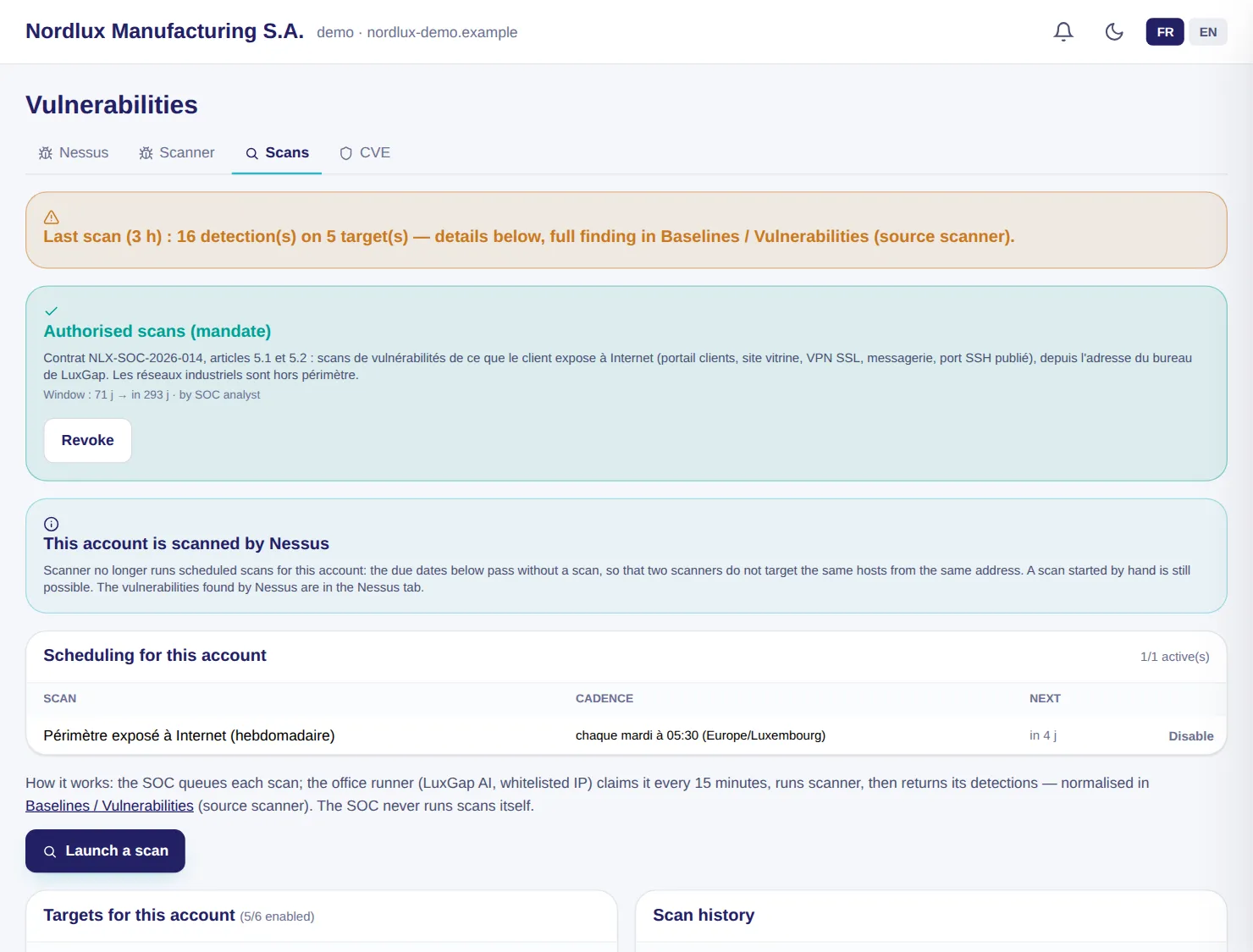
The exposed perimeter is scanned every Tuesday, before the offices open; this morning's check no longer sees SSH port 2222, closed by the crisis team.

Set-up: Signed scan mandate and operation authorised under your contractual framework.

LuxGap SOC — Monitoring console
LuxGap SOC console: scans authorised by mandate, schedule and history
Demo client, fictitious data. Click a screenshot to enlarge it.

Exposed surface

The hosts you expose on the internet, found again every day without installing anything

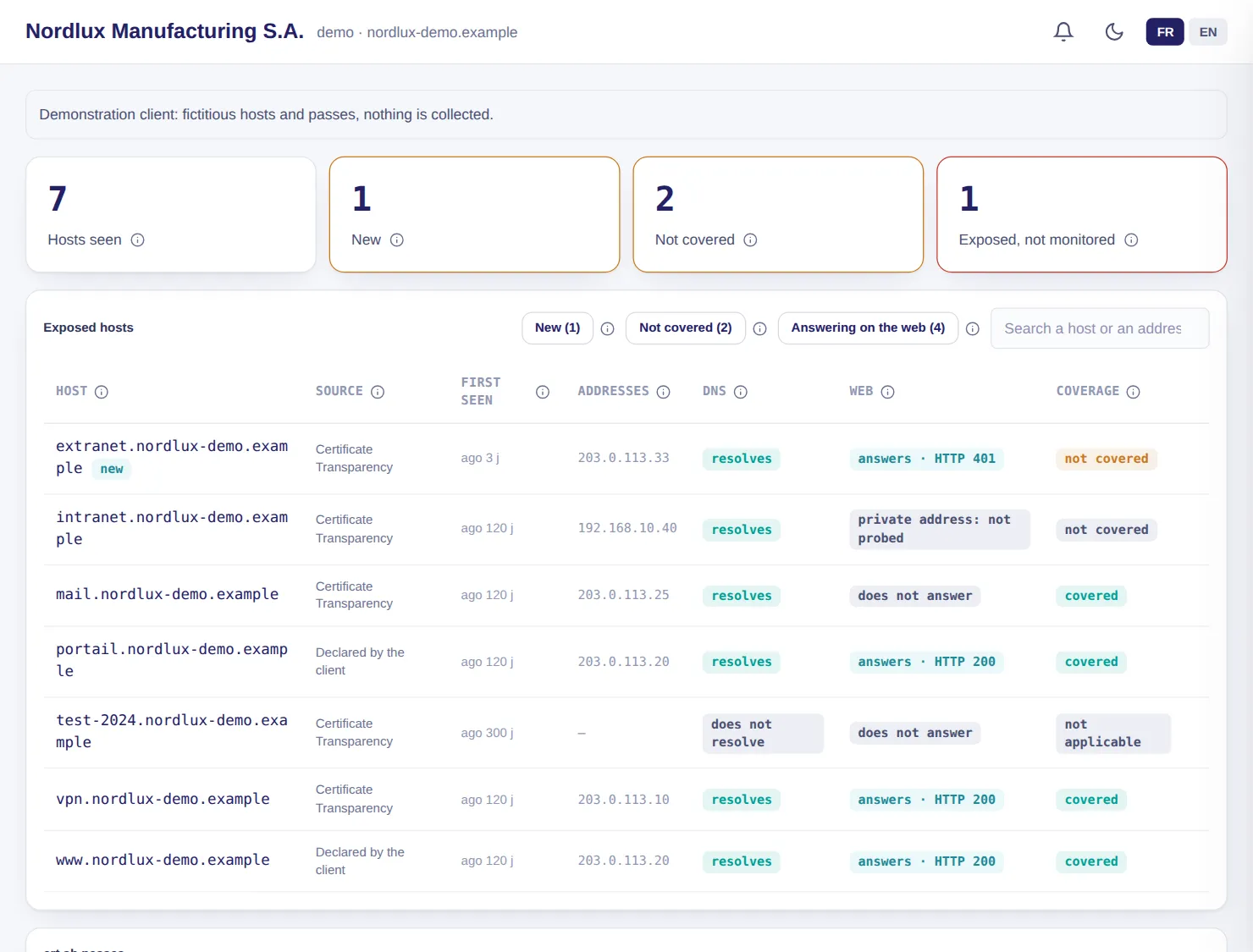
For each of your domains, the SOC reads every day the certificates published in the public Certificate Transparency logs, derives your host names from them, resolves them and checks whether they answer on the web. It compares them with what is already scanned: a new, live and unmonitored host raises an alert.

  • Public sources only: certificates, DNS and a single HEAD request, no port scanning
  • The HEAD request only goes to a domain you own (verified in your Microsoft 365 or declared by LuxGap)
  • No private address or industrial segment is ever probed
  • The first pass takes stock: only hosts that appear afterwards are ‘new’
  • Nothing is added to the scans without an analyst's decision

Example — demo client

Seven hosts are seen. The supplier extranet, which appeared three days ago in the public certificates, answers on the web and is covered by no scan: it is the exposed, unmonitored asset. The intranet, on a private address, is never probed.

Set-up: Included as soon as the SOC knows your domains (DNS audit, Microsoft 365). Visible to your administrator, never to read-only accounts.

LuxGap SOC — Monitoring console
LuxGap SOC console: exposed surface, hosts found in public certificates and their coverage by scans
Demo client, fictitious data. Click a screenshot to enlarge it.

Penetration testing

A penetration test followed end to end, and the proof of what monitoring saw

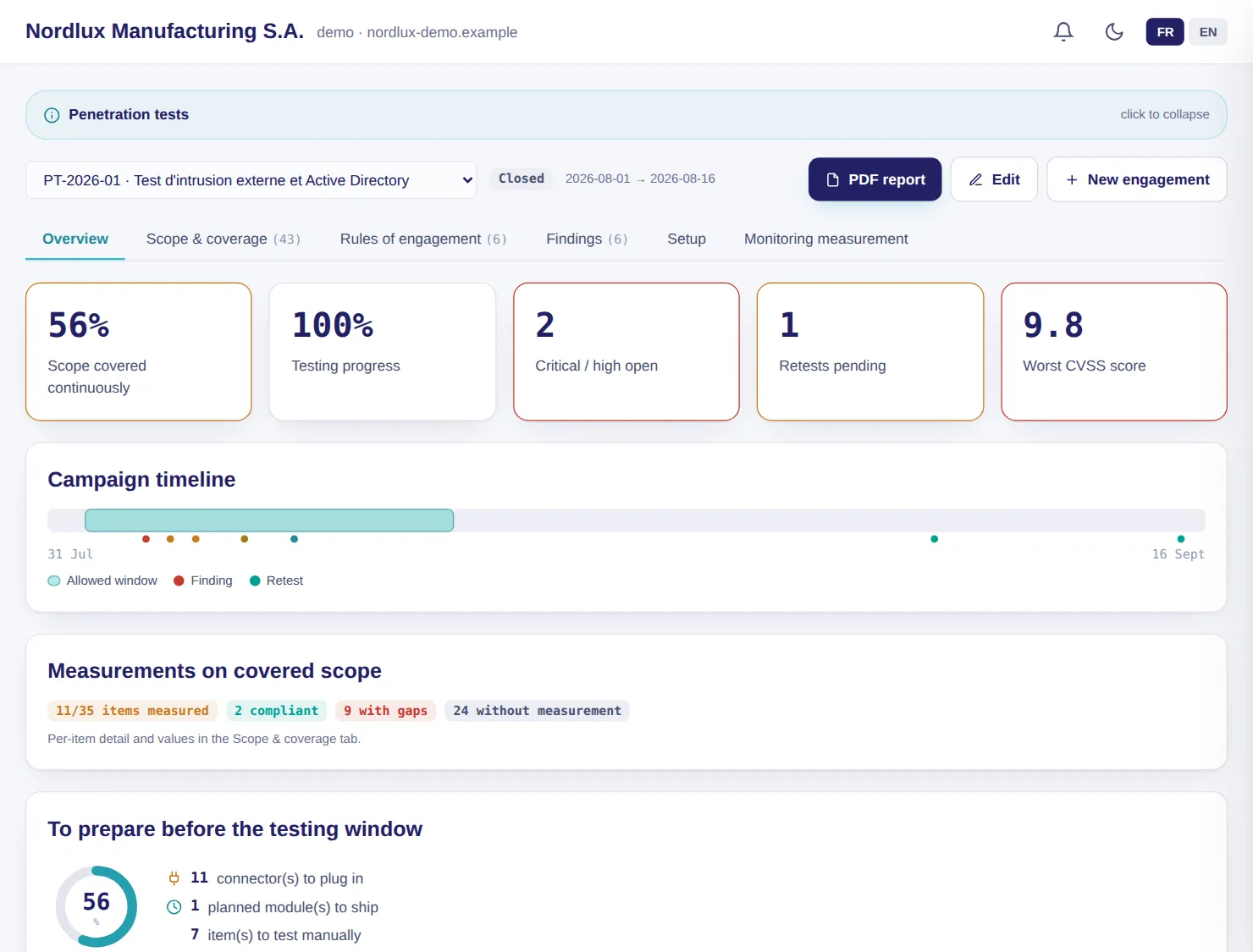
Scope, rules of engagement, findings and retests live in the console. During the test window, every action by the auditor is matched against what the SOC saw: alert raised, merely logged or invisible.

  • Findings scored in CVSS 3.1, quantified evidence, retests, PDF report
  • Scope coverage: the share of elements actually connected to monitoring
  • Detection rate and median detection time, measured
  • 26-step set-up guide: collection machine, VPN, assets, sensor

Example — demo client

On retest day, five of the auditor's actions raise an alert within 1 to 9 minutes; phishing stays invisible, and the report says so.

Set-up: Option, carried out by LuxGap experts; the console follows the test, it does not perform it.

LuxGap SOC — Monitoring console
LuxGap SOC console: penetration test, scope coverage and campaign progress
Demo client, fictitious data. Click a screenshot to enlarge it.

Leaks and lookalike domains

Your credentials in circulation and the domains that imitate yours

Thirteen intelligence sources are queried for your domains, and a specialist service lists your organisation's accounts found in credential leaks. Every night, the variants of your domain name are calculated and those that actually exist are flagged.

  • Monitoring of your domains from daily to yearly, weekly by default; alert on every new finding
  • Exposed accounts checked as often as every hour, with an alert as soon as one is detected
  • No password stored; Excel and PDF exports without passwords
  • Lookalikes: similar-looking letter, including Cyrillic or Greek, omission, hyphen, addition, different extension; ‘What to do?’ in five steps, through to takedown
  • For each live lookalike: mail server, domain creation date and issued certificate, to tell which one is ready to be used
  • Devices infected by a credential stealer (infostealer): affected site, device and identifier masked as the source provides them, never a password; one alert per device, and cutting the sessions proposed to an analyst
  • Validity of each leaked credential: probably still valid, changed since the leak or cannot be verified, based on the date of the last password change in Microsoft 365; the SOC never tests a stolen password

Example — demo client

The credentials of four employees appear in the ‘Collection 2026-Q2’ compilation: one is probably still valid, two have been changed since. Two infected devices are still to be handled, and the domain nordlux-dem0.example, with a zero in place of the o, is active in DNS with a mail server.

Set-up: Your domains placed under monitoring by LuxGap. Credential validity is read from your connected Microsoft 365.

LuxGap SOC — Monitoring console

Console views LuxGap SOC console: devices infected by a credential stealer, device and identifier masked LuxGap SOC console: lookalike domains with mail server, age and certificate, and validity of leaked credentials LuxGap SOC console: company accounts exposed in credential leaks
Demo client, fictitious data. Click a screenshot to enlarge it.

Targeted watch

Your executives, your IP addresses and your brands, searched for in leaks

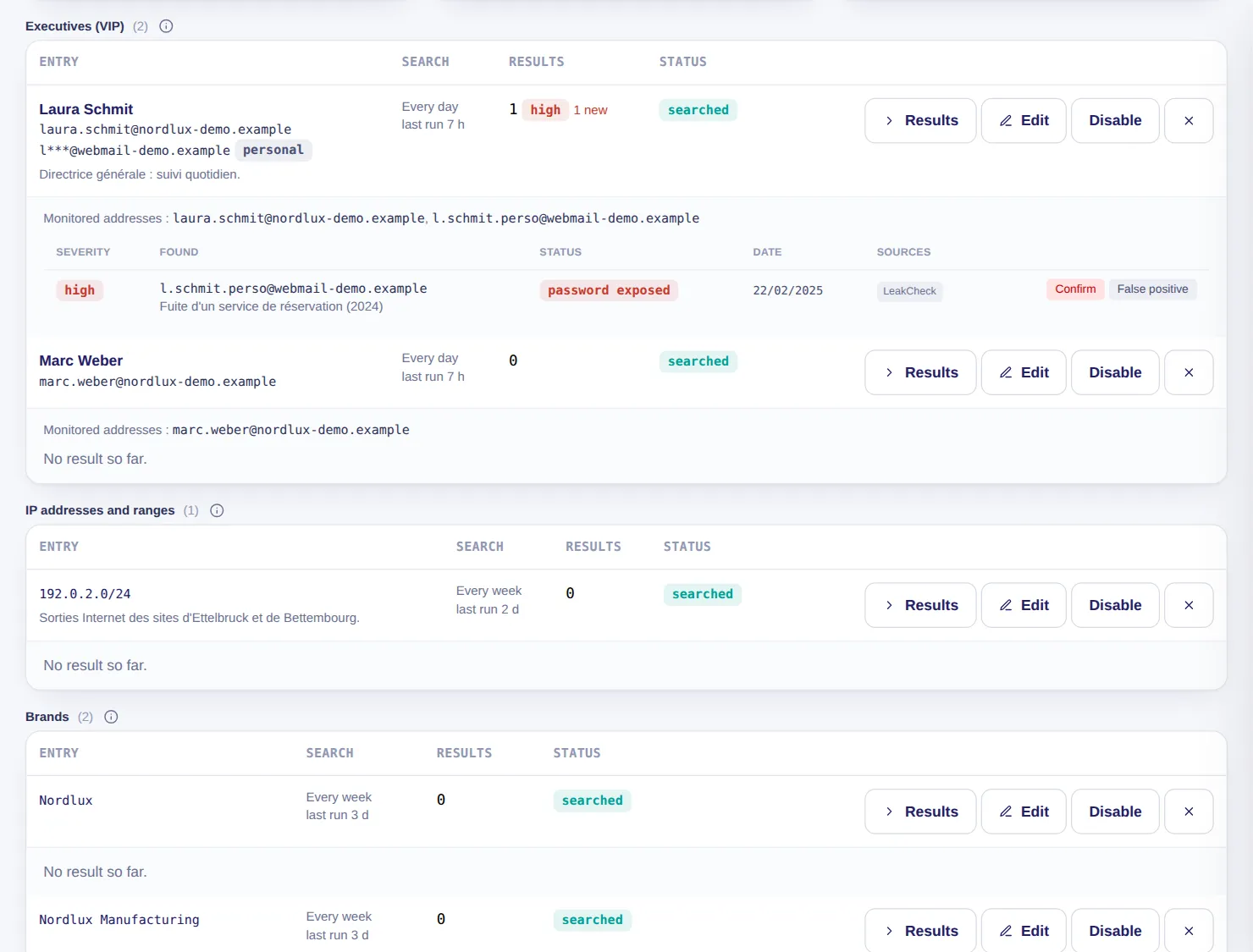
Beyond your domains, you keep a watchlist of up to 75 entries: your executives' email addresses (one to five each), your IP addresses, your brands and keywords. Each entry is searched for in the leak sources already connected to the SOC, and an alert goes out when something new appears.

  • Each entry is searched for every week or every month, and every day for an executive
  • High severity when an executive is found, critical if their password appears in a leak less than a year old
  • Your administrator can only add addresses from your verified domains, searched 24 hours after being added; an executive's personal address goes through LuxGap
  • A brand or a keyword is never used to find a person
  • No password stored; a source that was not queried is reported as such, never presented as ‘nothing found’

Example — demo client

Two executives, one IP address range and two brands are watched. The CEO's personal address appears, with its password, in the leak of a booking service from 2024: new result, high severity.

Set-up: Nothing to install: your administrator creates the entries in the console, or LuxGap creates them for you. Executives' names and addresses are reserved for your administrator and LuxGap, never visible to read-only accounts.

LuxGap SOC — Monitoring console

LuxGap SOC console: targeted watch, executives, IP addresses and brands watched, with an executive's result
Demo client, fictitious data. Click a screenshot to enlarge it.

Ransomware

Alerted when you or one of your suppliers appears on an extortion group's leak site

Extortion groups publish the list of their victims to apply pressure. The SOC reads these publications every 30 minutes and matches them against your domains and those of your suppliers. A publication that cites one of your domains raises a critical alert; one naming a supplier raises a high alert.

  • No client or supplier name is sent to the source: the public feed is read in full, then matched at LuxGap
  • A match on the name alone remains a hypothesis: an analyst triages it before any alert
  • A domain or supplier you add is compared against the entire history already collected
  • A supplier alert says what to do: contact them, re-read the contract and the data processing agreement, renew shared secrets
  • Country threats: publications from the last 30 or 90 days, by group and by country

Example — demo client

PayLux Services S.A., the payroll provider, has appeared on an extortion group's leak site for 12 days: the console flags it, with the steps to follow with the supplier.

Set-up: Included. Your domains (DNS audit) and each supplier's website (third-party register) make the alert automatic.

Source of the publications: RansomLook (www.ransomlook.io), CC BY 4.0 licence.

LuxGap SOC — Monitoring console

Console views LuxGap SOC console: leak-site publications matched against the client and its suppliers LuxGap SOC console: extortion-group publications by group and by country
Demo client, fictitious data. Click a screenshot to enlarge it.

Websites and online services

Alerted as soon as a website, an API or a mail server stops responding

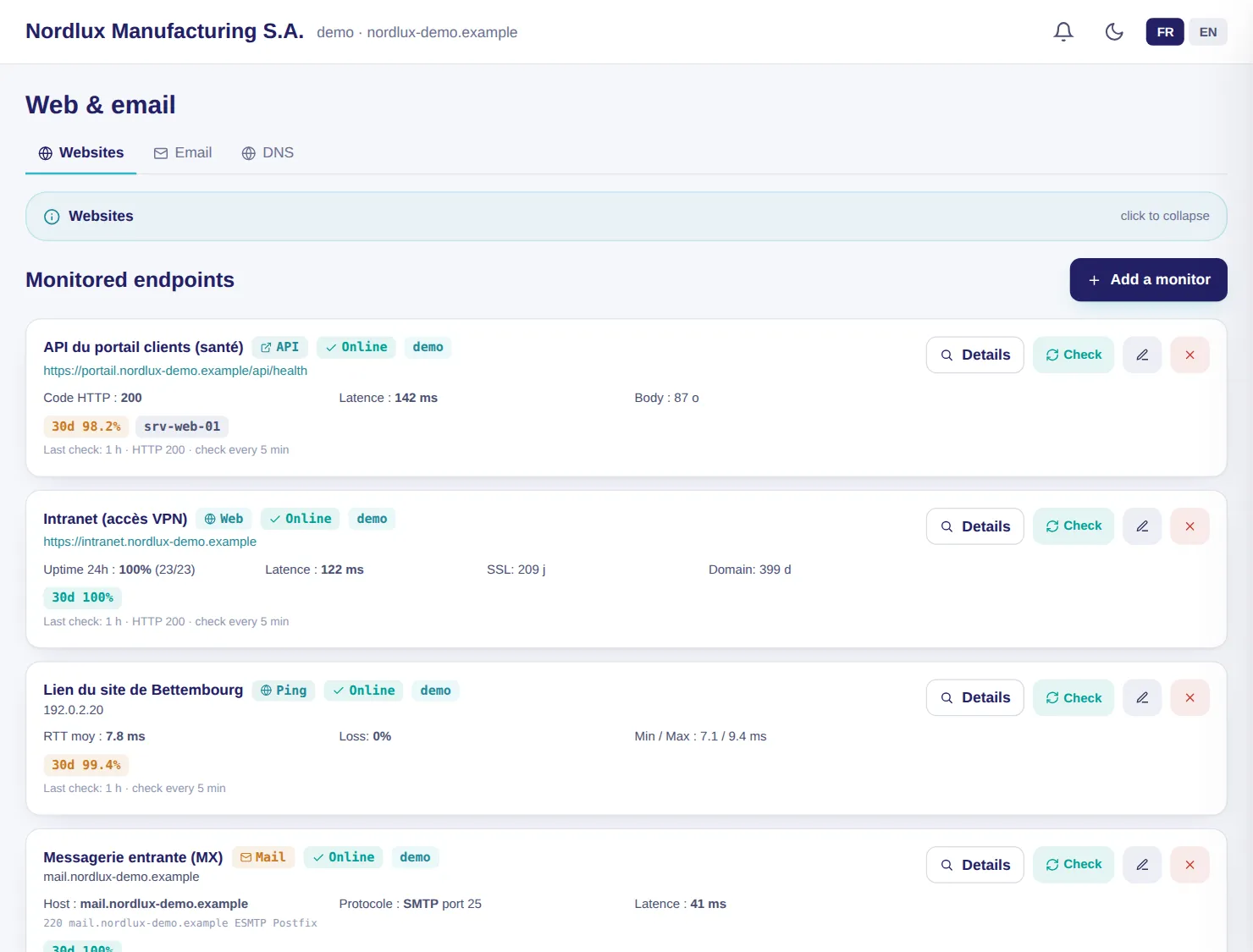
Seven types of monitor: website, API, TCP port, ping, email (SMTP, POP3, IMAP), blocklists and heartbeat. The web monitor checks the response code, latency, a keyword, the certificate, domain expiry and defacement.

  • Alert 21 days before a certificate expires, 30 days before a domain does
  • Alert after two consecutive failures, to avoid false outages
  • A content change is judged by LuxGap's AI before concluding defacement

Example — demo client

The customer portal went down for three hours (502 error), then came back; its certificate expires in 12 days, which puts it in ‘degraded’ state.

Set-up: An address is enough.

LuxGap SOC — Monitoring console

LuxGap SOC console: website, API and email monitors
Demo client, fictitious data. Click a screenshot to enlarge it.

DNS

Your domain audited in one table: email, signature, security

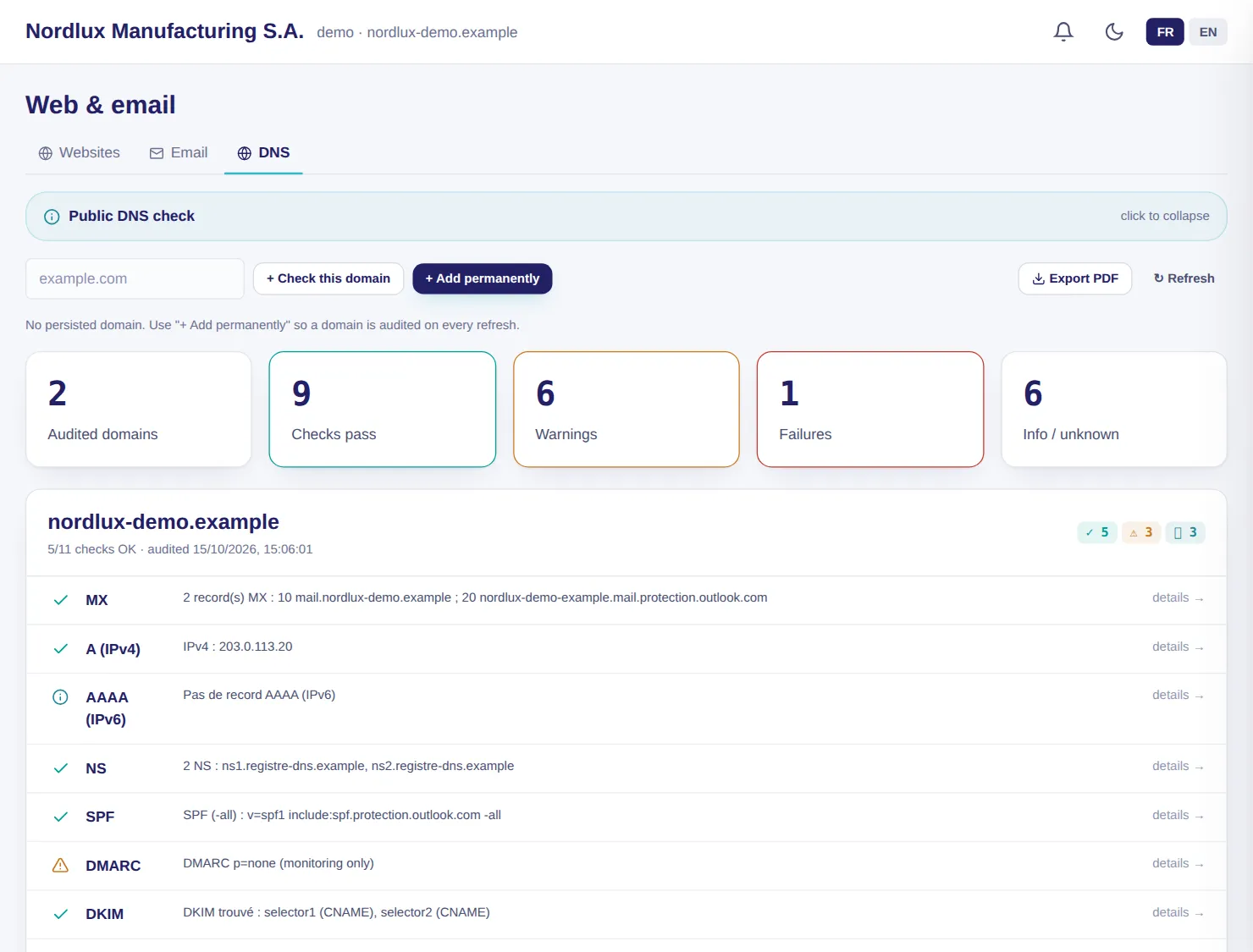
Eleven checks on your domains: MX, A, AAAA, NS, SPF, DMARC, DKIM, DNSSEC, CAA, MTA-STS and BIMI, each with the observed record and the recommendation.

  • Up to 20 domains monitored
  • PDF export with the domains × controls matrix
  • No connector needed

Example — demo client

SPF and DKIM are compliant, but DMARC remains in monitoring mode: the console recommends moving to quarantine, then to reject.

Set-up: A domain name is enough.

LuxGap SOC — Monitoring console

LuxGap SOC console: public DNS check of a domain
Demo client, fictitious data. Click a screenshot to enlarge it.

Servers

The status of every server and what is drifting, without opening a single port

A lightweight agent, Linux or Windows, sends its measurements every 60 seconds over outbound HTTPS. Each indicator opens onto its list: failed SSH and RDP sign-ins, signed-in accounts, listening ports, scheduled tasks, local administrators.

  • Posture and drift with their age: ‘restart required for 12 days’
  • Daily security score, 30-day history of memory and disk
  • AI infrastructure watch: a critical or high risk becomes a tracked alert

Example — demo client

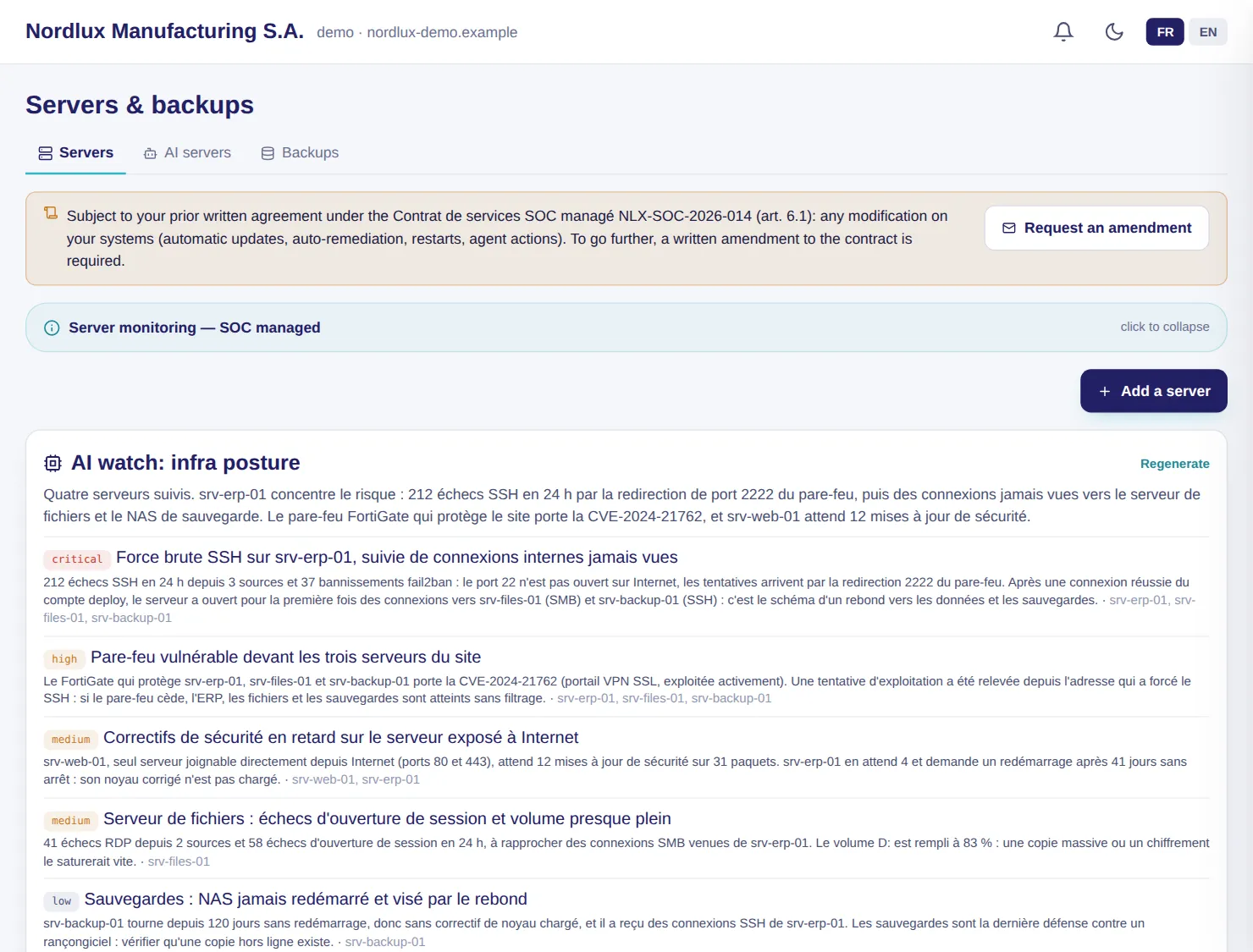
The ERP server suffers 212 failed SSH sign-ins in 24 hours through the port 2222 forwarding; the AI watch links that port to the vulnerable firewall and to the pivot towards the other servers.

Set-up: The agent installed on each server, with a token specific to that server.

LuxGap SOC — Monitoring console

LuxGap SOC console: AI infrastructure watch and monitored servers
Demo client, fictitious data. Click a screenshot to enlarge it.

Backups

What is backed up, where, and the alert when a backup fails or goes silent

Databases, folders and volumes are backed up to your Synology NAS, encrypted to two keys. A failure raises an alert, and so does silence: two missed periods are enough.

  • Summary per server and restore procedure generated for each backup
  • Off-site copies monitored by heartbeat
  • Alerts from your Synology NAS brought into the console

Example — demo client

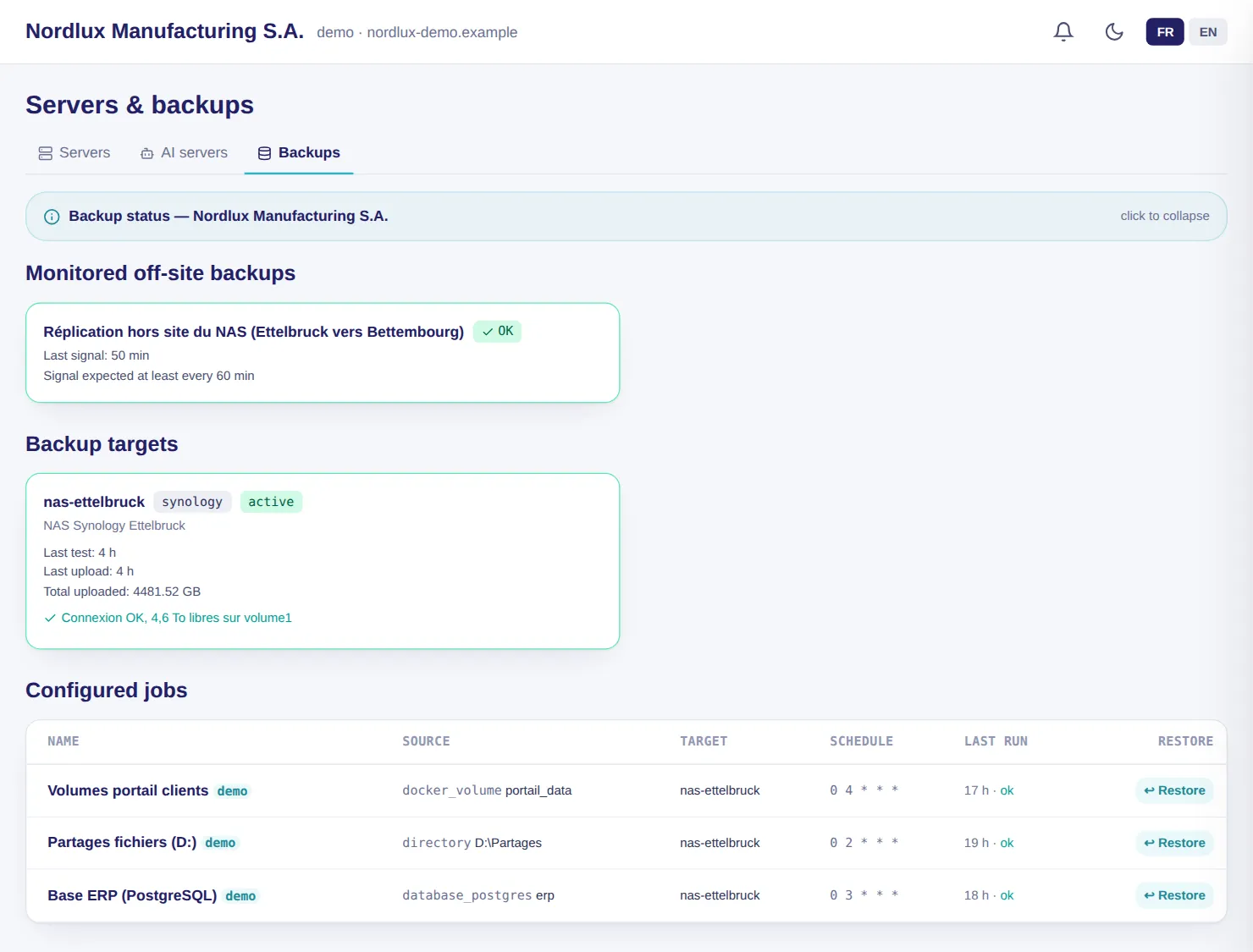
The customer portal volume backup failed three days ago, quota reached; the next day's backup went back to green.

Set-up: A Synology NAS reachable by the SOC.

LuxGap SOC — Monitoring console

LuxGap SOC console: monitored backups, off-site replication and configured jobs
Demo client, fictitious data. Click a screenshot to enlarge it.

Exposure report

Before any contract: what your domain reveals to an attacker, scored out of 100

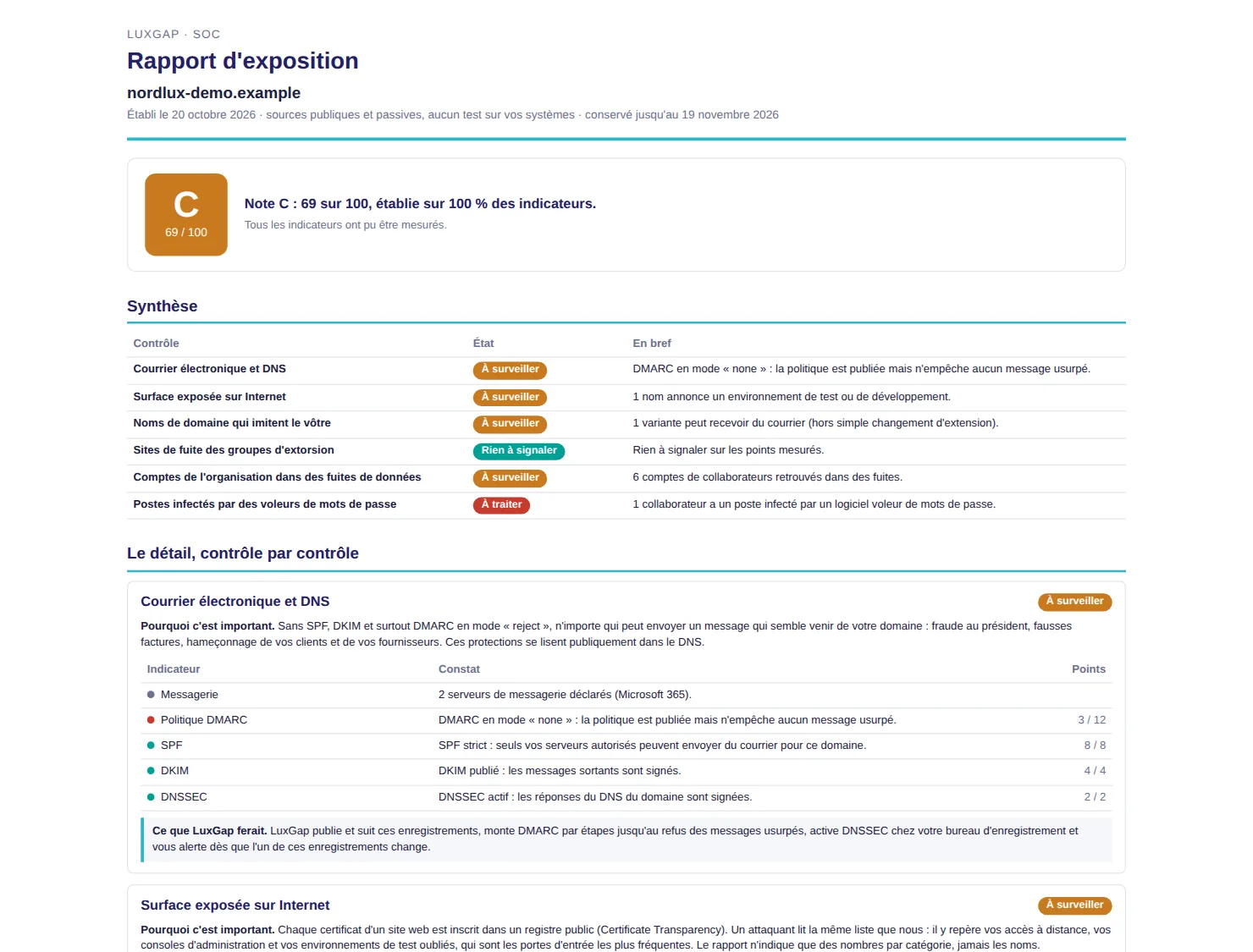
From your domain name alone, a LuxGap analyst draws up your exposure report: what anyone can learn about you without touching a single one of your servers. Email and DNS, public certificates, domains imitating yours, extortion groups' leak sites, your employees' accounts in leaks, infected devices: each finding says why it matters and what LuxGap would do.

  • Public and passive sources only: no connection to your servers, no web request, no port test
  • Score out of 100 whose formula is given in the report (eleven indicators); what could not be measured is stated, never counted as a zero, and no score is given below 50% coverage
  • Numbers and categories only: no name, no address, no password
  • A snapshot at a given date, neither an audit nor a certification; its content is erased after 30 days

Example — fictitious domain

For nordlux-demo.example: DMARC set to ‘none’, one variant of the domain able to receive mail, six employee accounts in leaks and one infected device, nothing on leak sites. Score C, 69 out of 100.

Set-up: Service billed on quotation, a few days of work. Your domain name is all it takes; the report is delivered as a PDF, in French.

Exposure report — fictitious example

LuxGap SOC exposure report on a fictitious domain: score C, 69 out of 100, summary and first detailed check
Fictitious domain, fictitious data. Click the image to enlarge it.

These modules, on your own perimeter

Describe what you want monitored: firm quote within 24 hours, annual contract, 100% guaranteed perimeter.

Request onboarding See pricing

Dealing with an incident right now? Call +352 621 583 116.