Skip to content
LuxGapSOC
Monitoring active
EN
Console sign-in Request onboarding

← All features

Compliance

Compliance and governance: NIS2, ISO 27001 and CMMC managed from the same console

The SOC's technical findings feed your compliance roadmaps directly. You see where you stand, where to start and with what evidence, with no spreadsheet to keep up to date. The console helps you steer your programme; certification is still issued by an accredited body.

All screenshots come from the LuxGap SOC console, on a demo client: the company Nordlux Manufacturing and its data are fictitious.

NIS2 gaps

Everything that keeps you from NIS2 compliance, filed under measures a) to j) of Article 21

Vulnerabilities found by scanners and penetration tests, CVEs in your estate, failing configuration controls and roadmap steps still open: one line per gap, filed under the measure it undermines.

  • Open critical and high gaps, fixed over 30 days, unverified controls, age
  • Filters by type (technical, configuration, organisational), severity and status
  • An unverified control is counted separately, never read as ‘nothing to report’

Example — demo client

10 critical and 32 high gaps are open, 4 were fixed in 30 days; under measure b), DMARC in monitoring mode sits alongside the incident management procedure still in progress.

Set-up: Delivered with the penetration testing option.

LuxGap SOC — Monitoring console
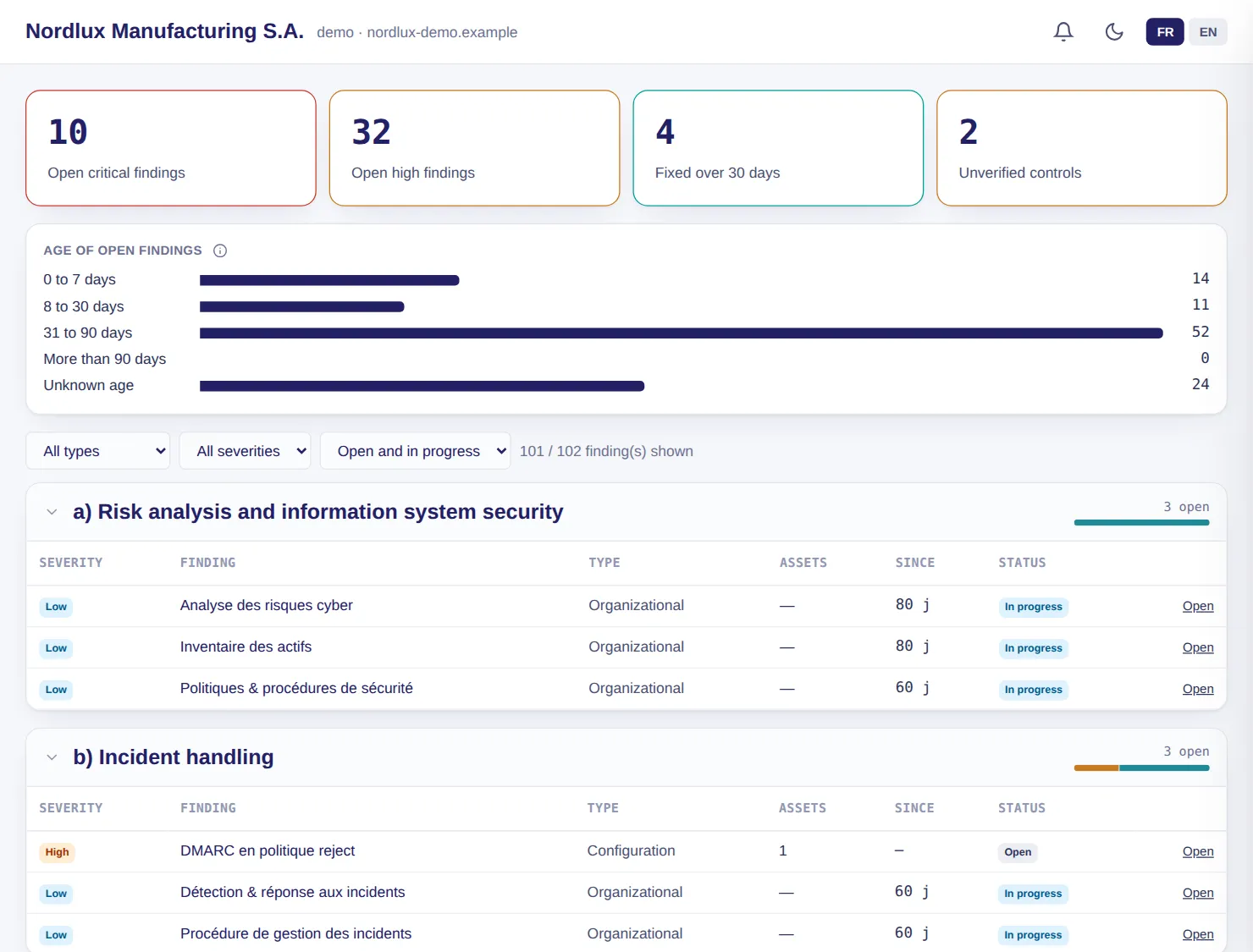
LuxGap SOC console: NIS2 gaps sorted by Article 21 measure
Demo client, fictitious data. Click a screenshot to enlarge it.

Roadmaps

NIS2, ISO 27001 and CMMC tracked step by step, backed by technical evidence

The NIS2 roadmap tracks 15 steps in four phases, from scoping to audit. The ISO 27001 roadmap covers clauses 4 to 10 and the 93 Annex A controls, with your statement of applicability. The CMMC roadmap tracks the 110 level 2 practices.

  • Steps pre-filled from technical findings: evidence alone never validates a step
  • Excluding a control or declaring it not applicable requires a justification
  • One owner per control, chosen from the role directory of your ISMS
  • PDF report, ZIP evidence pack with hashes, statement of applicability in Excel

Example — demo client

The ISO 27001 roadmap is 78% complete; six Annex A controls are excluded for lack of in-house development, two are blocked with their reason: the budget for the second hypervisor and the ERP acceptance environment.

Set-up: Frameworks enabled according to your scope.

LuxGap SOC — Monitoring console
Console views LuxGap SOC console: NIS2 roadmap, progress and deadlines LuxGap SOC console: ISO 27001 roadmap and ISMS indicators LuxGap SOC console: CMMC level 2 roadmap by domain
Demo client, fictitious data. Click a screenshot to enlarge it.

Compliance priorities

Where to start: your open requirements sorted by urgency

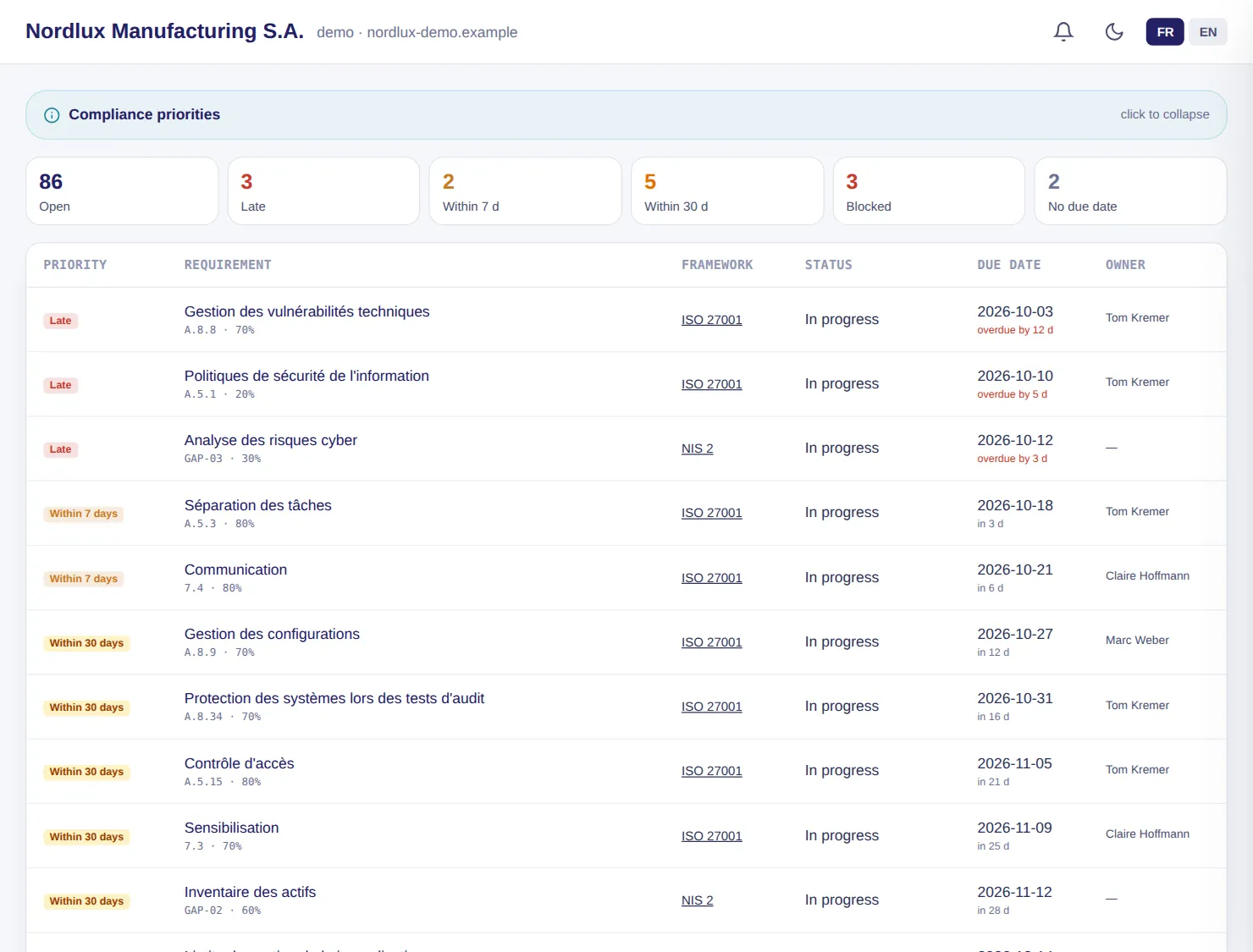
The open requirements of all your frameworks, sorted into five tiers: overdue, within 7 days, within 30 days, scheduled, no due date. With equal due dates, a blocked item comes first.

  • Completed, not applicable and excluded controls are left out
  • Framework and owner on every line

Example — demo client

86 requirements are open, 3 of them overdue: technical vulnerability management is 12 days late, awaiting the firewall patch.

Set-up: As soon as a framework is enabled.

LuxGap SOC — Monitoring console

LuxGap SOC console: compliance priorities by urgency tier
Demo client, fictitious data. Click a screenshot to enlarge it.

Documents

Your policies and minutes filed once, linked to every requirement

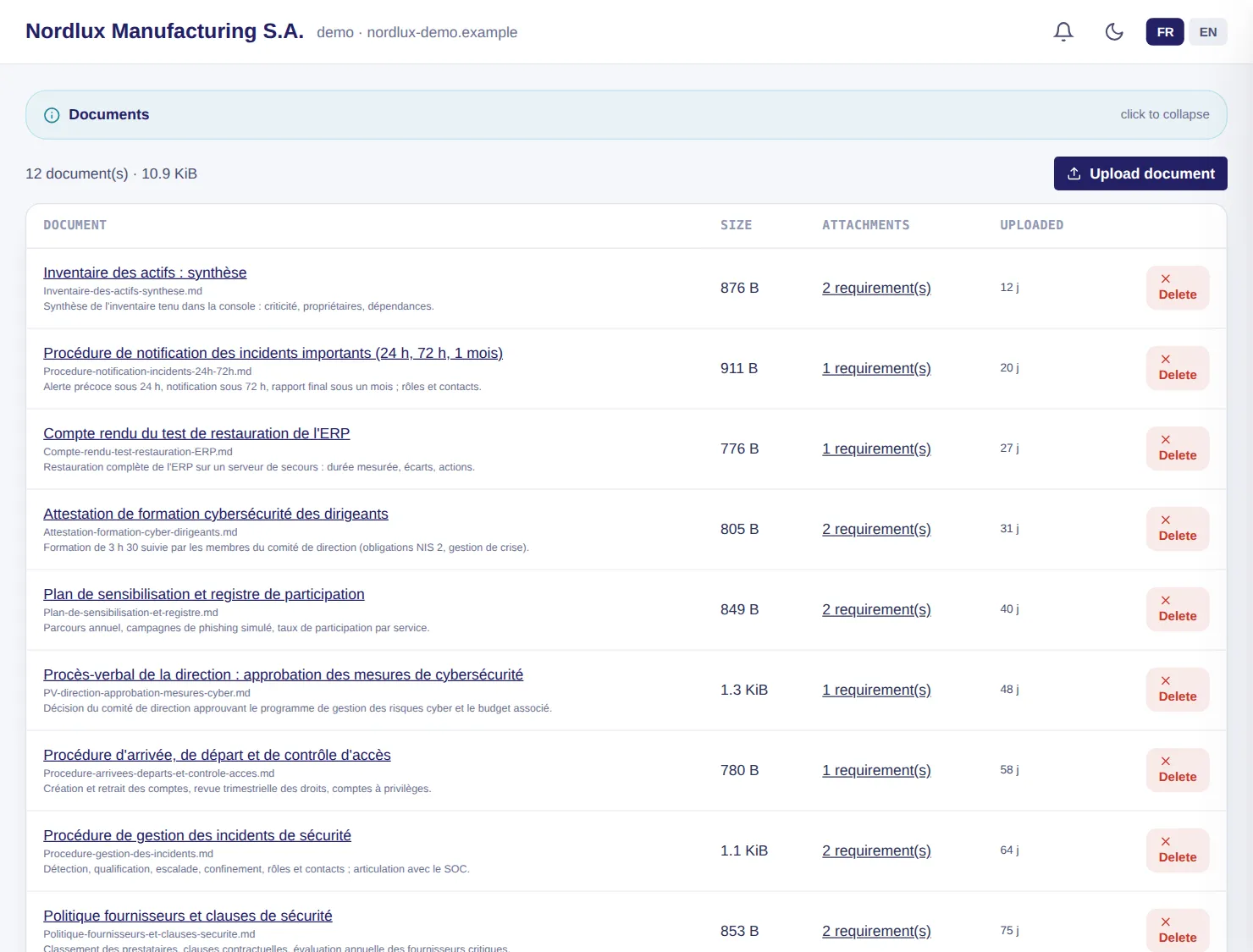
One document serves several NIS2, ISO 27001 or CMMC requirements, and the console lists what is missing. With your written agreement, LuxGap's AI reads a document and proposes the requirements it covers, and never changes a status without human validation.

  • Duplicates spotted by hash; detaching a document does not delete it
  • 25 MB per file, 500 documents per client
  • Analysis by LuxGap's AI only, never by an external provider

Example — demo client

Twelve documents cover nineteen requirements; the report of the ERP restore test (5 h 40 against a target of 8 h) supports measure c) of NIS2.

Set-up: AI analysis with written agreement, provided for in your contractual framework.

LuxGap SOC — Monitoring console

LuxGap SOC console: uploaded documents and linked requirements
Demo client, fictitious data. Click a screenshot to enlarge it.

TOMs

Your self-assessment of technical and organisational measures, analysed

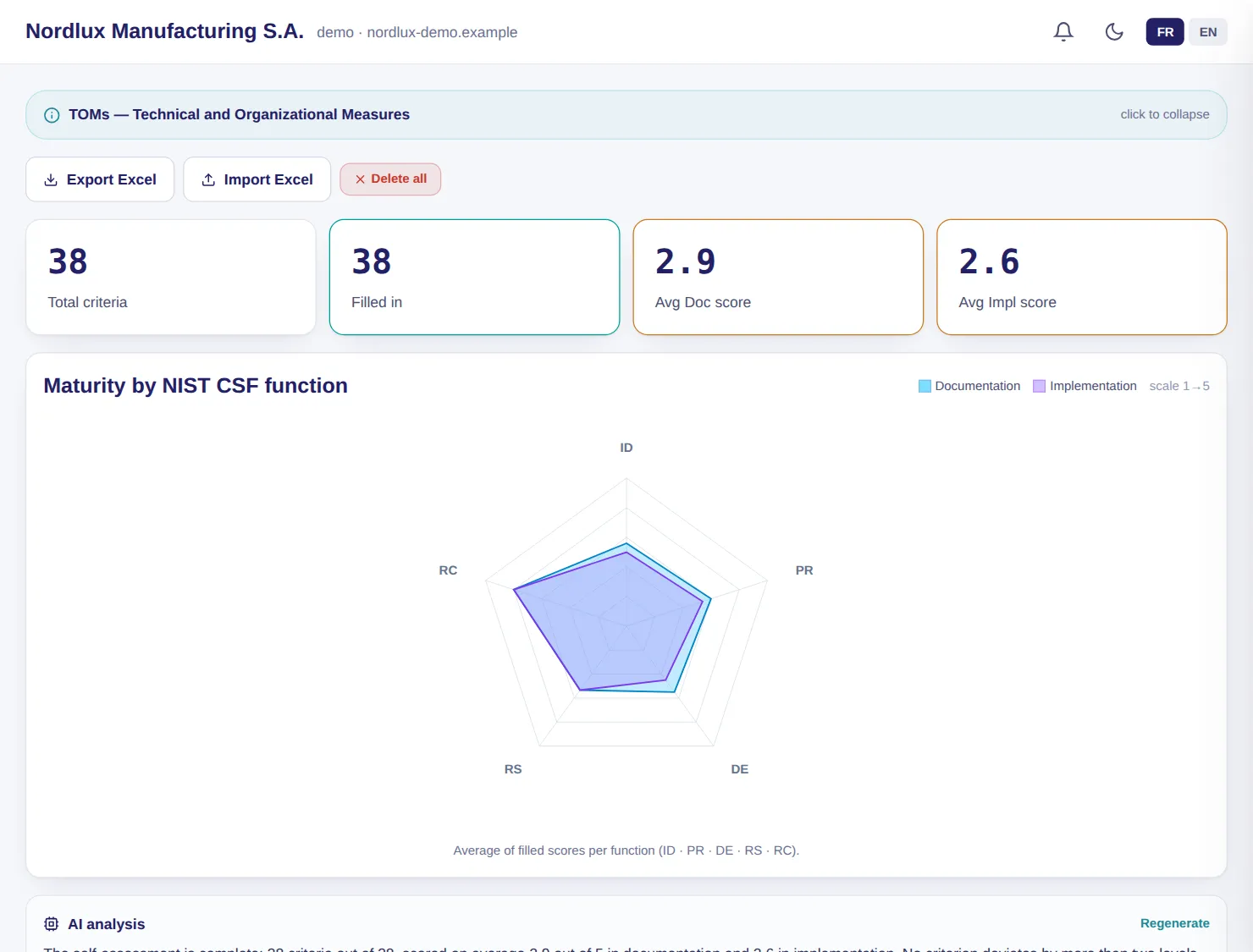
38 criteria arranged under the five NIST CSF functions, scored from 1 to 5 for documentation and for implementation. LuxGap's AI spots what is documented but not applied and proposes one to three priorities; the figures are calculated, not written.

  • An unscored criterion remains unknown, never a zero
  • Excel import and export

Example — demo client

The proposed priority: separate administration accounts from everyday accounts.

Set-up: Included for all clients.

LuxGap SOC — Monitoring console

LuxGap SOC console: TOMs, maturity by NIST CSF function
Demo client, fictitious data. Click a screenshot to enlarge it.

Registers

Suppliers, assets and risks kept in the same place as monitoring

The third-party register serves the GDPR and NIS2 supply chain security. The asset inventory feeds CVE watch. The risk register rates each risk before and after your measures, with an action plan and an owner.

  • Third parties: data processed, location, data processing agreement, certifications, annual review
  • Assets: vendor, product and version, to match published flaws automatically
  • Risks: likelihood × impact, heat maps before and after controls
  • Excel import and export for every register

Example — demo client

The annual review of the payroll provider is overdue; the ‘ransomware encrypting the ERP’ risk drops from 15 to 8 once immutable backups are in place.

Set-up: Included for all clients.

LuxGap SOC — Monitoring console

Console views LuxGap SOC console: register of third parties and subcontractors LuxGap SOC console: inventory of assets ready for CVE watch LuxGap SOC console: risk register and heat maps
Demo client, fictitious data. Click a screenshot to enlarge it.

Continuity plan

Your continuity plan, from the business impact analysis to the crisis exercise

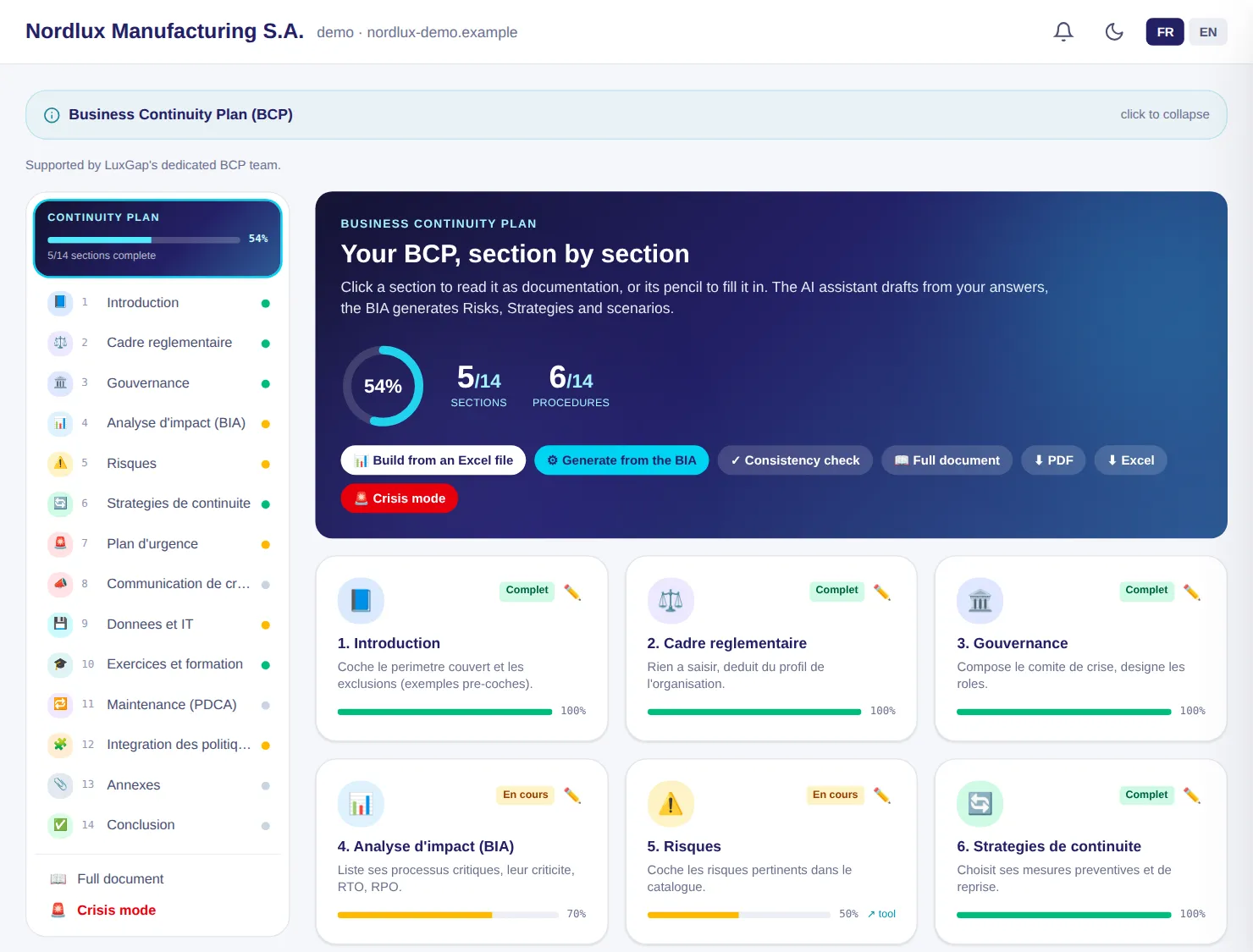
Fourteen sections, from the regulatory framework to the appendices, and fourteen emergency procedures, from fire to ransomware. The impact analysis is imported from an Excel workbook and generates risks, strategies and appendices without overwriting anything.

  • Section-by-section writing assistant, which marks what it does not know as ‘TO BE COMPLETED’
  • Consistency check, full document, PDF and Excel
  • Crisis mode: tick-box steps and timestamped log

Example — demo client

In a crisis, line 2 carries on under local control, without the ERP; its recovery is expected within 4 hours, with at most one hour of data lost.

Set-up: Option, carried out with LuxGap's continuity team.

LuxGap SOC — Monitoring console

LuxGap SOC console: business continuity plan, section by section
Demo client, fictitious data. Click a screenshot to enlarge it.

Contractual framework

What LuxGap is allowed to do in your environment, enforced by code

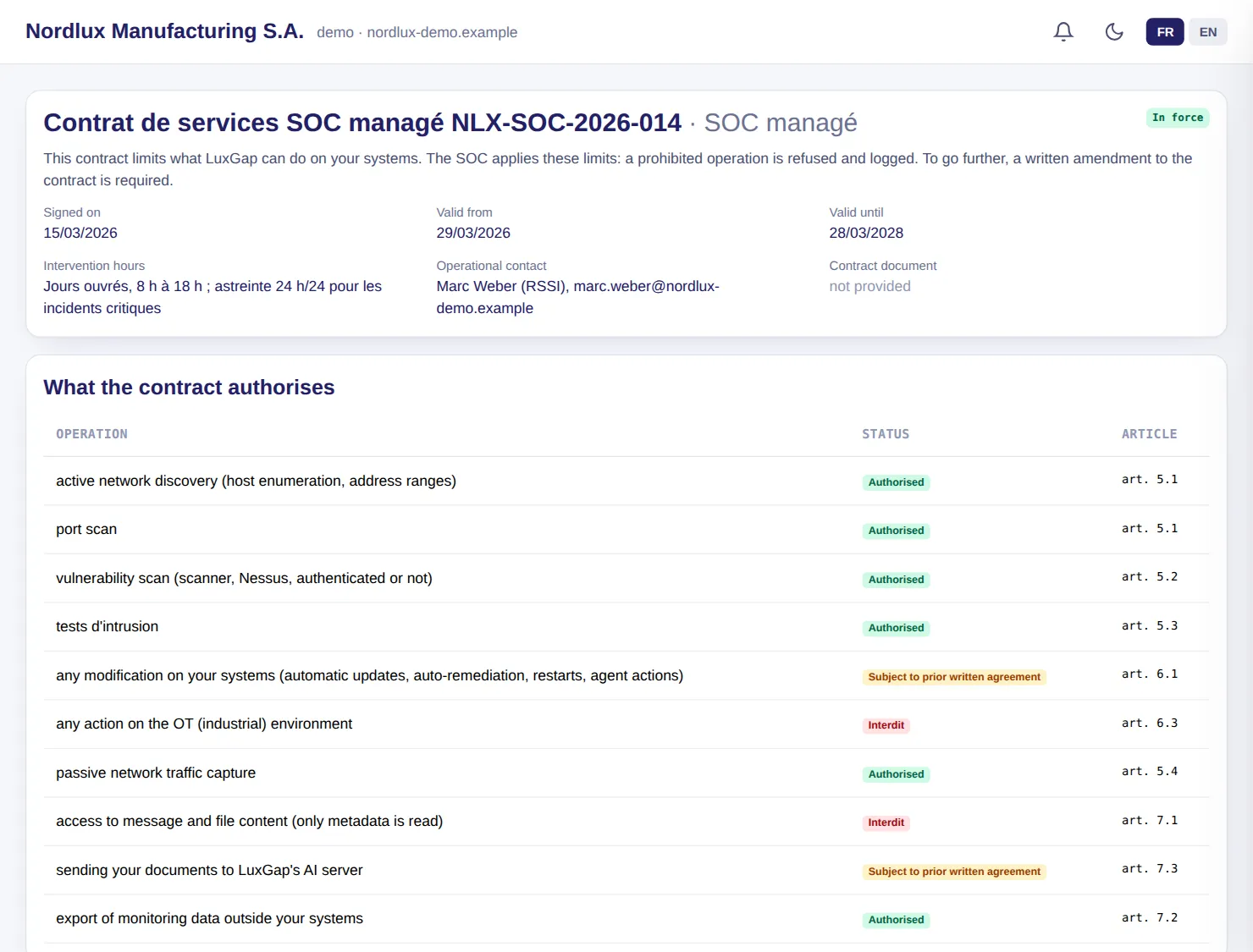
Ten operations, each one authorised, prohibited or subject to prior written agreement, with the contract article. Every active SOC operation is checked against this framework; outside its period of validity, everything is refused.

  • Visible to your teams as soon as it is in place
  • A button to request an amendment

Example — demo client

Any action on the industrial environment and access to the content of messages are prohibited; modifying systems and sending documents to the AI server require written agreement.

Set-up: Put in place by LuxGap when the contract is signed.

LuxGap SOC — Monitoring console

LuxGap SOC console: contractual framework, operations authorised, prohibited or subject to agreement
Demo client, fictitious data. Click a screenshot to enlarge it.

Tasks and decisions

The actions to take, assigned and tracked, and the record of your decisions

Tasks arise from alerts, findings and recommendations, or are created by hand, with priority, effort and due date. The decision log keeps a dated record of every exception, compensating measure or accepted risk.

  • Shared with your IT provider, who moves their own tasks forward
  • Append-only, timestamped log

Example — demo client

The P1 task ‘Update FortiOS 7.2.7 and disable the SSL VPN web portal’ is in progress; the decision ‘Temporary exception: 4 service accounts without MFA’ is justified and dated.

Set-up: Included for all clients.

LuxGap SOC — Monitoring console

Console views LuxGap SOC console: assigned and tracked tasks LuxGap SOC console: timestamped decision log
Demo client, fictitious data. Click a screenshot to enlarge it.

Reports

An executive report every month, a technical report on demand

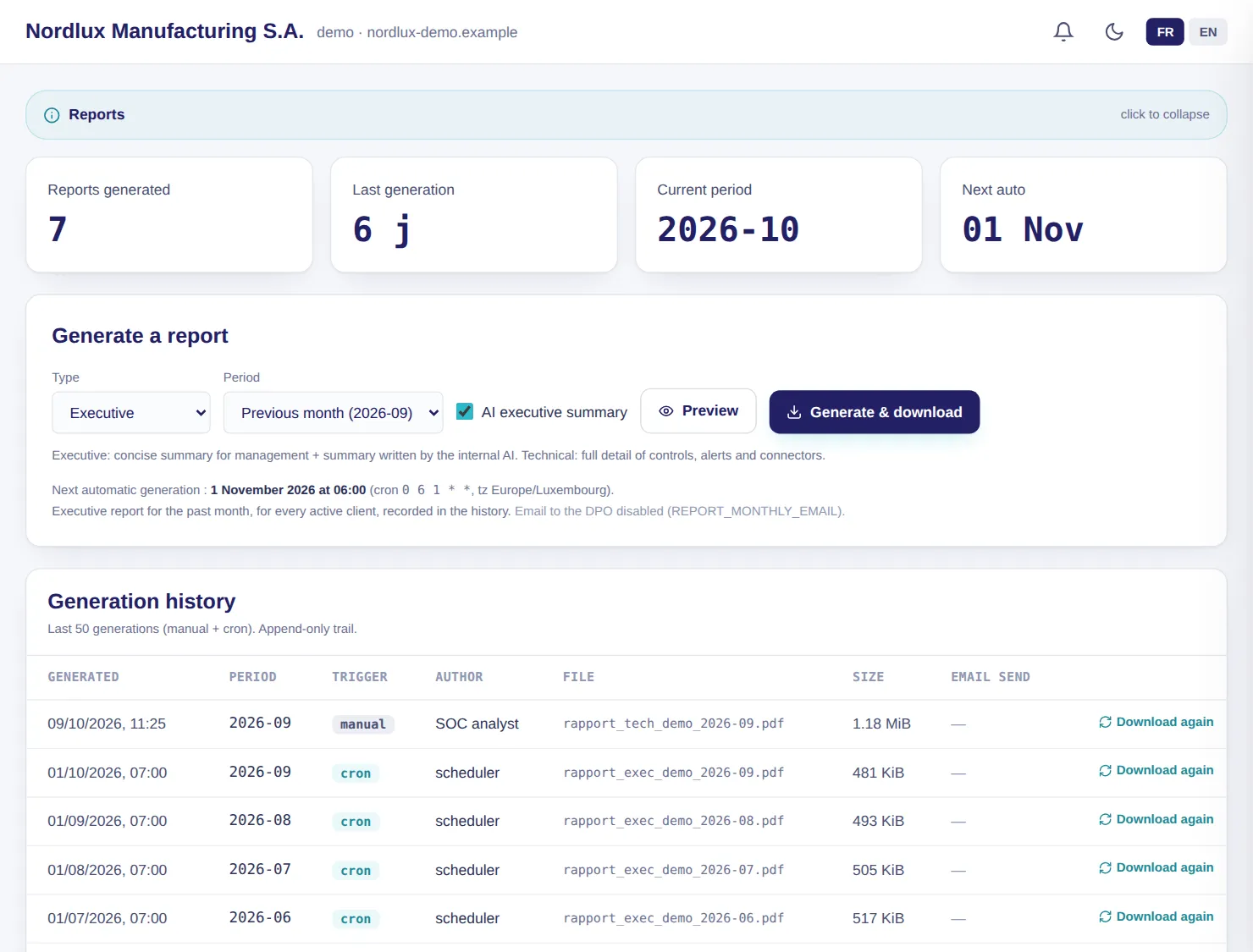
The executive report is generated automatically on the 1st of the month for each client, with a summary written by LuxGap's AI; the technical report details controls, alerts and findings. The history keeps every generation.

  • Preview before generation
  • Full report: all active sections, including any gaps

Example — demo client

Seven reports are in the history: six executive reports generated by the scheduler and one technical report requested by an analyst.

Set-up: Included for all clients.

LuxGap SOC — Monitoring console

LuxGap SOC console: generated reports and history
Demo client, fictitious data. Click a screenshot to enlarge it.

These modules, on your own perimeter

Describe what you want monitored: firm quote within 24 hours, annual contract, 100% guaranteed perimeter.

Request onboarding See pricing

Dealing with an incident right now? Call +352 621 583 116.