Skip to content
LuxGapSOC
Monitoring active
EN
Console sign-in Request onboarding

← All features

Microsoft 365 and endpoints

Microsoft 365, Google Workspace and endpoints: configuration verified, deviations explained

The SOC reads your cloud services read-only, checks their configuration at every synchronisation and tells you, setting by setting, what to fix and how. Your antivirus and EDR feed into the same place.

All screenshots come from the LuxGap SOC console, on a demo client: the company Nordlux Manufacturing and its data are fictitious.

Configuration controls

Your Microsoft 365 checked point by point, and what has drifted since

39 controls cover Entra ID, Exchange, Intune, Defender, Teams, Purview and SharePoint. Each one is mapped to the frameworks that require it: CIS, NIST CSF, NIS2, GDPR, DORA, ISO 27001, Essential 8 and the Microsoft security baseline.

  • Synchronised every hour; a control that regresses raises a drift alert
  • A control that could not be evaluated, for lack of permission or licence, is reported as such, never counted as compliant
  • Step-by-step remediation guide for every deviation, or a direct request to LuxGap
  • Maturity levels Essentials, Core, Advanced and Premium

Example — demo client

The DMARC policy has remained in monitoring mode (p=none): the control is in deviation, with its fix. The share of compliant Microsoft 365 controls rose from 58% to 71% in three months.

Set-up: Read-only Microsoft 365 connector: an application consented to once by your administrator, no password stored.

LuxGap SOC — Monitoring console
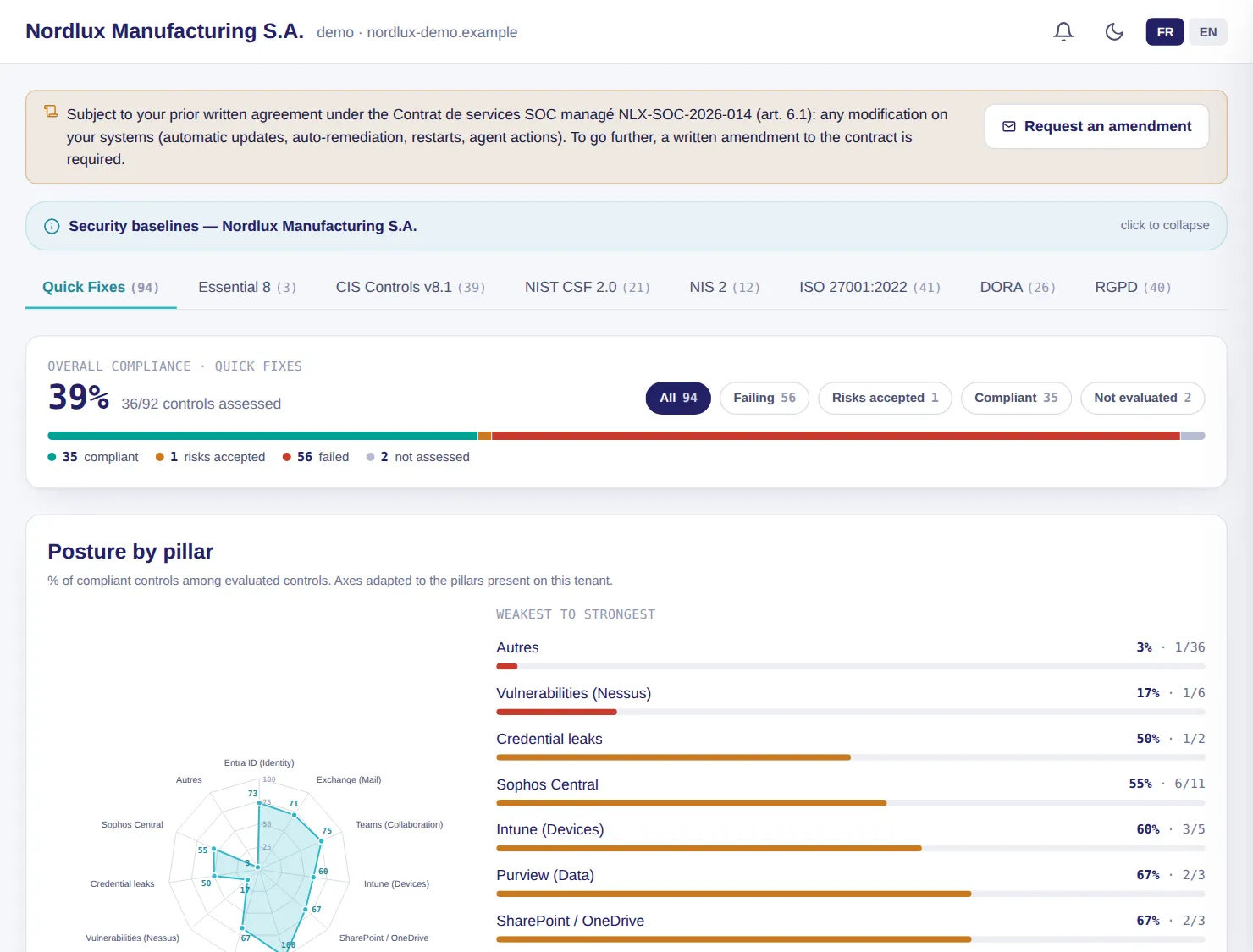
LuxGap SOC console: Microsoft 365 security controls by framework and by pillar
Demo client, fictitious data. Click a screenshot to enlarge it.

AI posture analysis

A grade from A to F, the risks that matter and the plan to deal with them

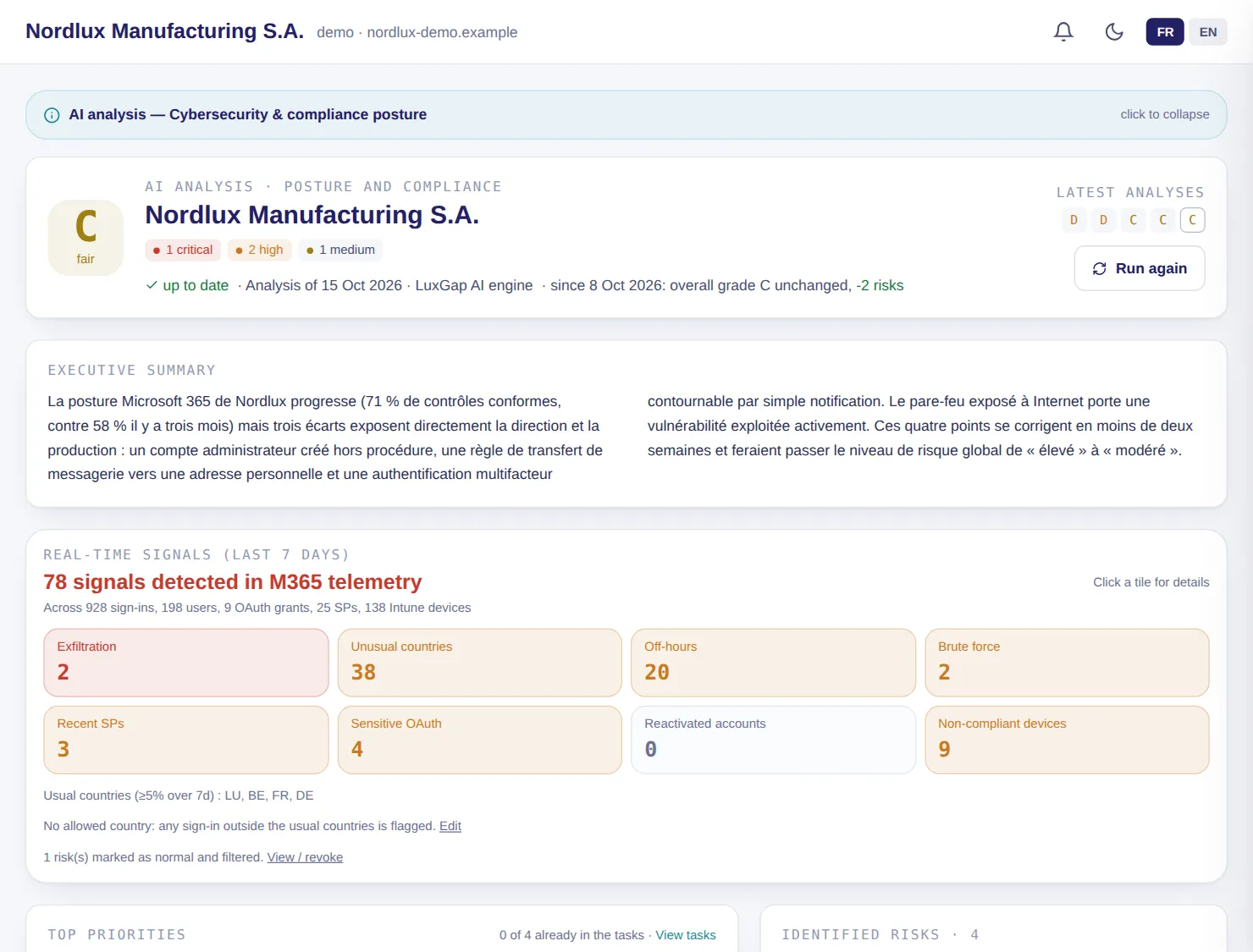
Every week, LuxGap's AI cross-references configuration, anomalies and sign-ins to grade your posture, name the risks with their evidence and propose a prioritised plan. The trend across recent analyses shows whether you are improving.

  • Summary for management, identified risks, priority actions and strengths
  • Signals from the last seven days: unusual countries, atypical hours, bursts of failed sign-ins, dormant accounts reactivated, sensitive OAuth permissions, non-compliant devices
  • Each risk gets a follow-up: taken in charge, fixed, false positive, or accepted and entered in the risk register
  • Written by default on LuxGap's AI server

Example — demo client

The grade stays at C, but two risks have disappeared since the previous week; 78 signals were recorded in seven days, including 38 sign-ins from unusual countries.

Set-up: Microsoft 365 or Google Workspace connector.

LuxGap SOC — Monitoring console

LuxGap SOC console: AI posture analysis, grade, summary for management and signals from the last seven days
Demo client, fictitious data. Click a screenshot to enlarge it.

Recommendations

The instructions for hardening your Microsoft 365, setting by setting

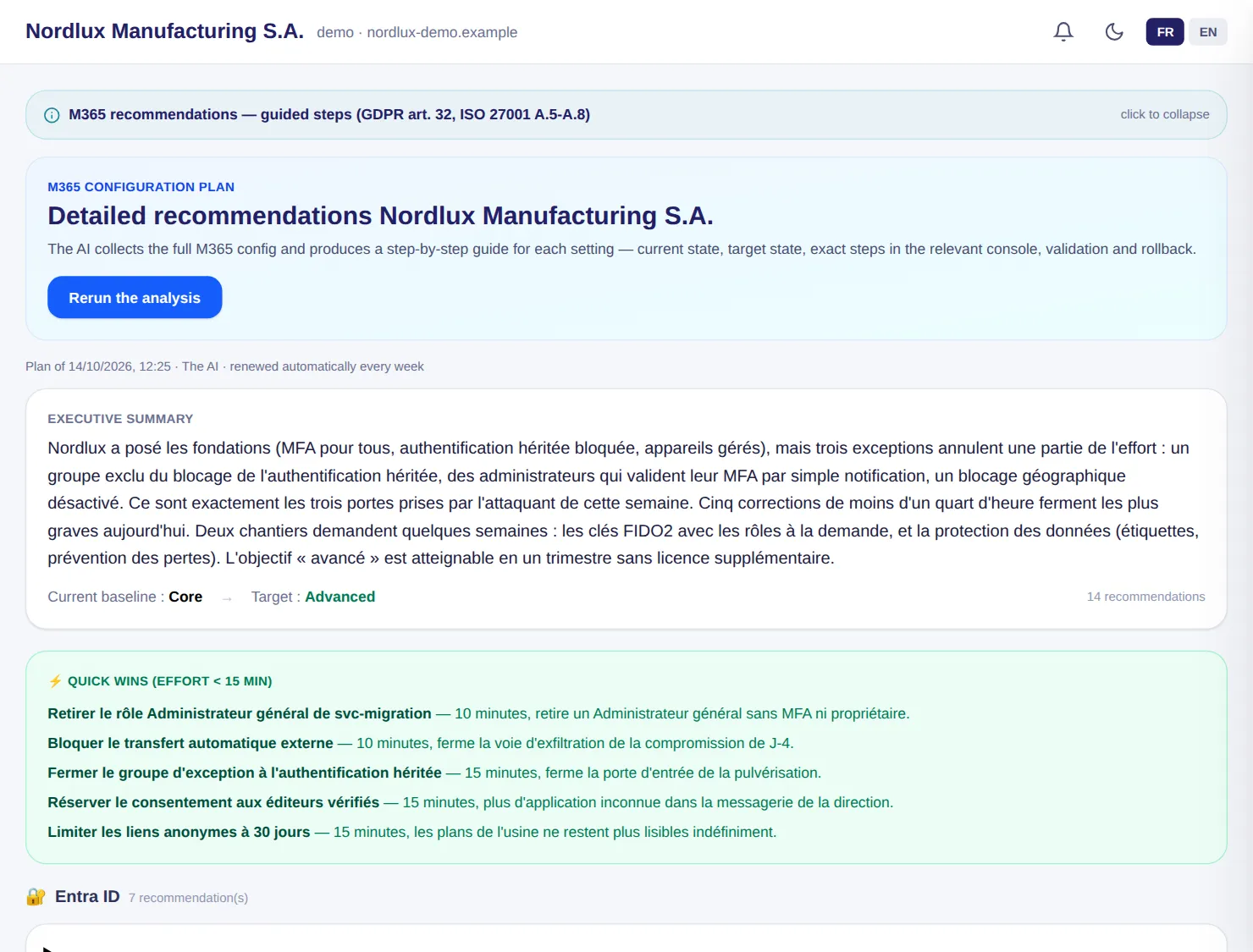
A plan renewed every week: for each setting, why to change it, the current state and the target, the exact steps in the right console, the PowerShell equivalent, how to verify and how to roll back.

  • Estimated effort, with quick wins of under 15 minutes first
  • Reference to CIS, NIST, GDPR art. 32, NIS2, DORA and ISO 27001 requirements
  • The page changes nothing on your side: you stay in control

Example — demo client

The plan starts with five quick wins, including ‘Close the exception group for legacy authentication’: the door the attacker came in through over IMAP.

Set-up: Microsoft 365 connector.

LuxGap SOC — Monitoring console

LuxGap SOC console: detailed Microsoft 365 recommendations, quick wins first
Demo client, fictitious data. Click a screenshot to enlarge it.

Administration rights

Who has which rights, and whether conditional access really protects you

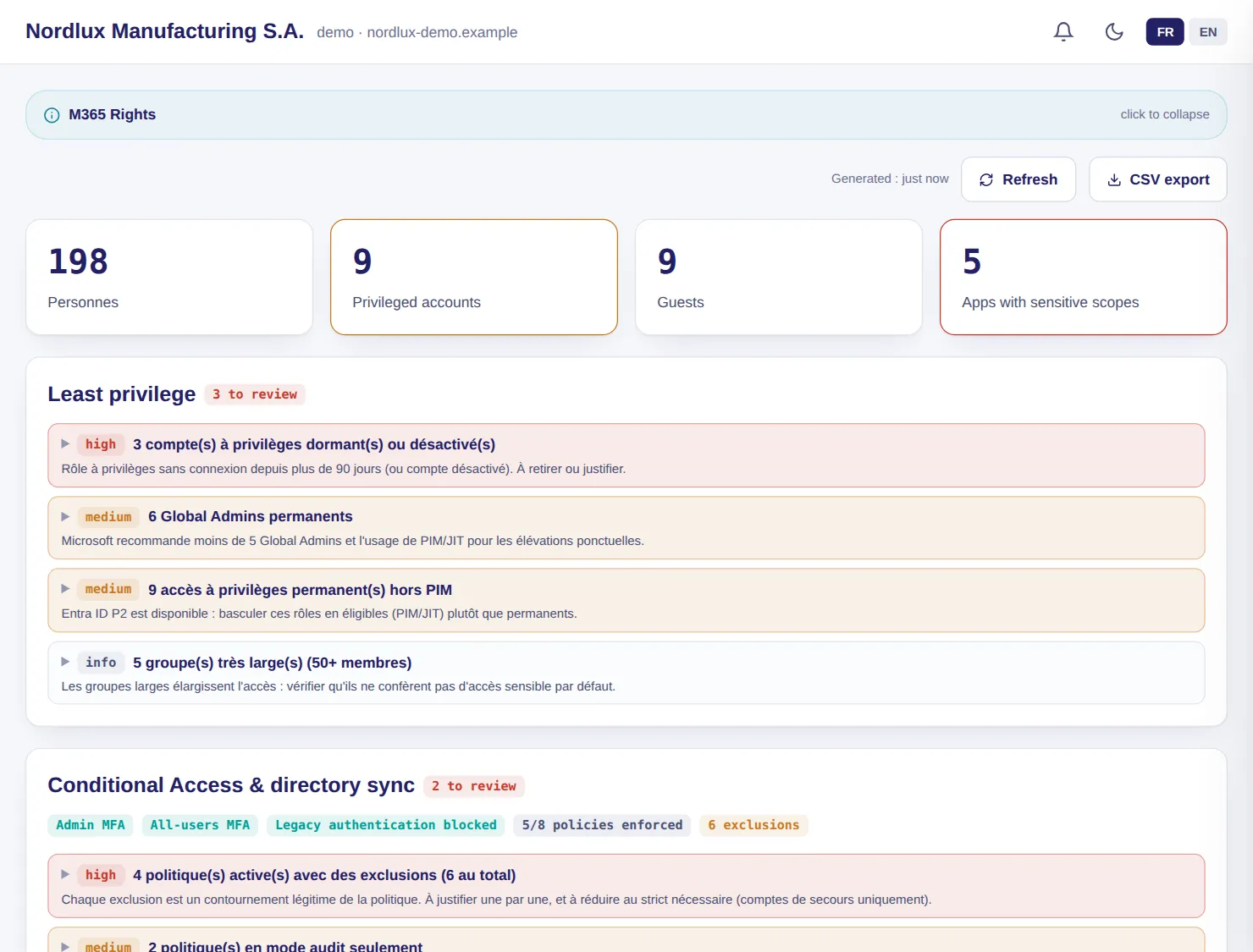
The matrix of people, roles, groups and licences, and the analysis of your conditional access policies to find what bypasses them: legacy authentication not blocked, exclusions, administrators without MFA, report-only policies.

  • Dormant privileged accounts, permanent Global Administrators, privileged access outside PIM
  • Live reading, read-only
  • Analysis carried out by LuxGap analysts, who pass on the conclusions to you

Example — demo client

The svc-migration account became Global Administrator without a ticket, and four active policies carry exclusions that need justifying.

Set-up: Microsoft 365 connector. Eligible PIM roles require an Entra ID P2 licence.

LuxGap SOC — Monitoring console

LuxGap SOC console: Microsoft 365 rights, least privilege and conditional access
Demo client, fictitious data. Click a screenshot to enlarge it.

Devices and applications

Managed, compliant and encrypted devices, and the applications that access your data

The Entra ID and Intune inventory shows which devices are managed, compliant and encrypted, and which escape control. Applications authorised in your directory are flagged when they are recent, request sensitive permissions or come from an unknown publisher.

  • Clickable figures that filter the tables, CSV export
  • Devices known to Entra ID but absent from Intune, inactive endpoints, systems at end of support
  • Conditional access and compliance policies, Intune profiles, authentication methods
  • Data: guests, sites, sensitivity labels

Example — demo client

7 non-compliant devices and 5 without encryption are listed with the reason for each deviation; the ‘PDF Converter Pro’ application, consented to by management, stands out with its sensitive permissions and unknown publisher.

Set-up: Microsoft 365 connector.

LuxGap SOC — Monitoring console

Console views LuxGap SOC console: Entra ID and Intune devices, compliance and fleet hygiene LuxGap SOC console: enterprise applications and their permissions
Demo client, fictitious data. Click a screenshot to enlarge it.

Email

Your email protected against spoofing and phishing

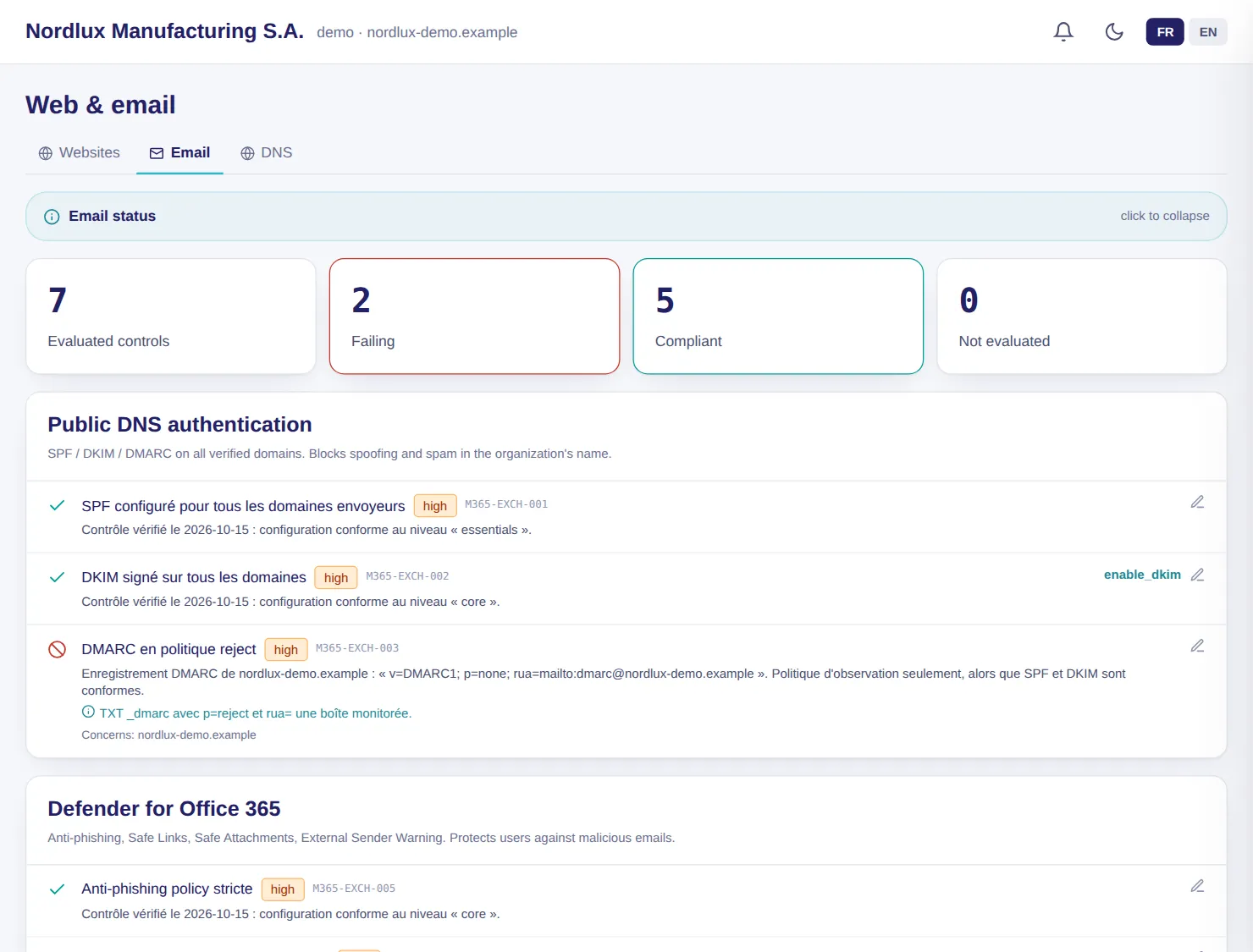
SPF, DKIM and DMARC on all your domains, Defender for Office 365 protections (anti-phishing, safe links and attachments, external sender warning) and mailbox auditing: each control with its recommendation.

  • Exchange Online and Gmail, depending on your connectors
  • Controls evaluated, failing and compliant at a glance
  • The content of your messages is never read

Example — demo client

7 controls are evaluated: SPF and DKIM are compliant, but DMARC remains in monitoring mode and safe links are not enabled.

Set-up: Microsoft 365 or Google Workspace connector.

LuxGap SOC — Monitoring console

LuxGap SOC console: email status, SPF, DKIM, DMARC and Defender for Office 365
Demo client, fictitious data. Click a screenshot to enlarge it.

Antivirus and EDR

Your antivirus alerts, finally read, correlated and tracked

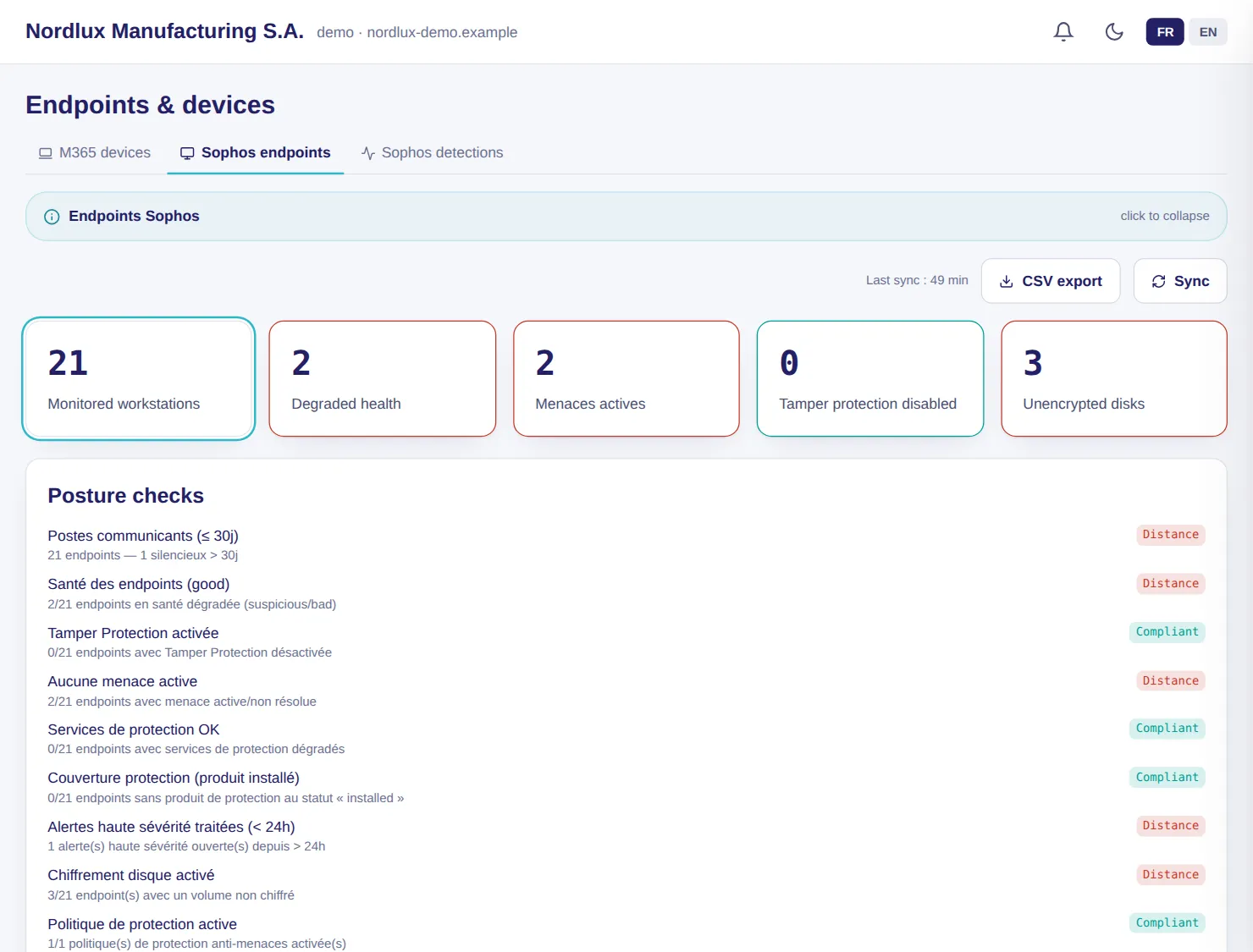
Sophos Central, ESET PROTECT and Microsoft Defender report endpoint status and detections to the console: silent endpoints, protection disabled, unhandled threats, unencrypted disks.

  • Read-only access created by you: the SOC cannot change anything in your antivirus console
  • Posture controls per vendor: health, tamper protection, encryption, coverage
  • A malware or ransomware detection becomes a critical alert
  • Defender XDR incidents with their timeline

Example — demo client

The 21 endpoints that Defender does not cover (workshop, laboratory, warehouse, three Macs) are tracked by Sophos; uncleaned malware on WS-PROD-11, which arrived on a contractor's USB stick, is flagged.

Set-up: Connector for your vendor, with read-only access. Defender incidents: Microsoft 365 connector and Defender licence.

LuxGap SOC — Monitoring console

LuxGap SOC console: monitored Sophos endpoints and posture controls
Demo client, fictitious data. Click a screenshot to enlarge it.

And also

The other modules in the family

Google Workspace

The same vigilance for Google Workspace

26 configuration controls, 7 of them dedicated to Gmail, and the same detectors as for Microsoft 365: risky sign-ins, public Drive shares, OAuth permissions, administrator actions.

  • Read-only service account: no write permission, ever
  • SPF, DKIM, DMARC, forwarding outside the domain and third-party applications on Gmail
  • The results feed the same pages: controls, email, data, applications, devices, AI analysis

Example

Automatic forwarding to an external address is enabled on a mailbox: the control goes into deviation and a drift alert is raised.

Set-up: A dedicated account created by your administrator, protected by a hardware security key.

Azure and Active Directory

Your Azure subscriptions and on-premises directory checked, read-only

For Azure, 12 controls spot databases open to the Internet, exposed administration ports, direct owners and public storage. For Active Directory, a read-only collector on a domain controller looks for the flaws that lead from an endpoint to domain administration.

  • Azure: a service principal with the Reader role, created and revocable by you
  • Active Directory: privileged accounts with a service principal name, unconstrained delegation, replication rights, passwords in GPOs, old krbtgt account, LAPS
  • No password or hash leaves your domain; anything that could not be read is reported as ‘not measured’, never ‘compliant’

Example

An Azure network rule allows remote desktop from the whole Internet: the control goes critical.

Set-up: Azure: an application with the Reader role on your subscriptions. Active Directory: Windows agent on a domain controller.

These modules, on your own perimeter

Describe what you want monitored: firm quote within 24 hours, annual contract, 100% guaranteed perimeter.

Request onboarding See pricing

Dealing with an incident right now? Call +352 621 583 116.