
Skip to content
LuxGapSOC
Monitoring active
EN
Console sign-in Request onboarding

← All features

Console and AI

The console and the AI: what your teams see, and who does what

A console in French and English, protected by two-factor authentication, where every module says what it is for. The AI that triages, analyses and writes is LuxGap's own, hosted by LuxGap.

All screenshots come from the LuxGap SOC console, on a demo client: the company Nordlux Manufacturing and its data are fictitious.

Dashboard

Your situation on one page: score, alerts, to do, status by family

The security score and its trend, open alerts, what needs handling (priority tasks, overdue deadlines, blocking findings) and the status of each family: vulnerabilities, leaks, endpoints, web, servers and backups, compliance.

  • A measurement that is down shows as ‘not measured’, never zero
  • The last 72 hours and the to-do list
  • Monthly report and full report in one click

Example — demo client

16 alerts are open, 5 of them critical, 39 items need handling and the 6 connected sources are active.

Set-up: Included.

LuxGap SOC — Monitoring console
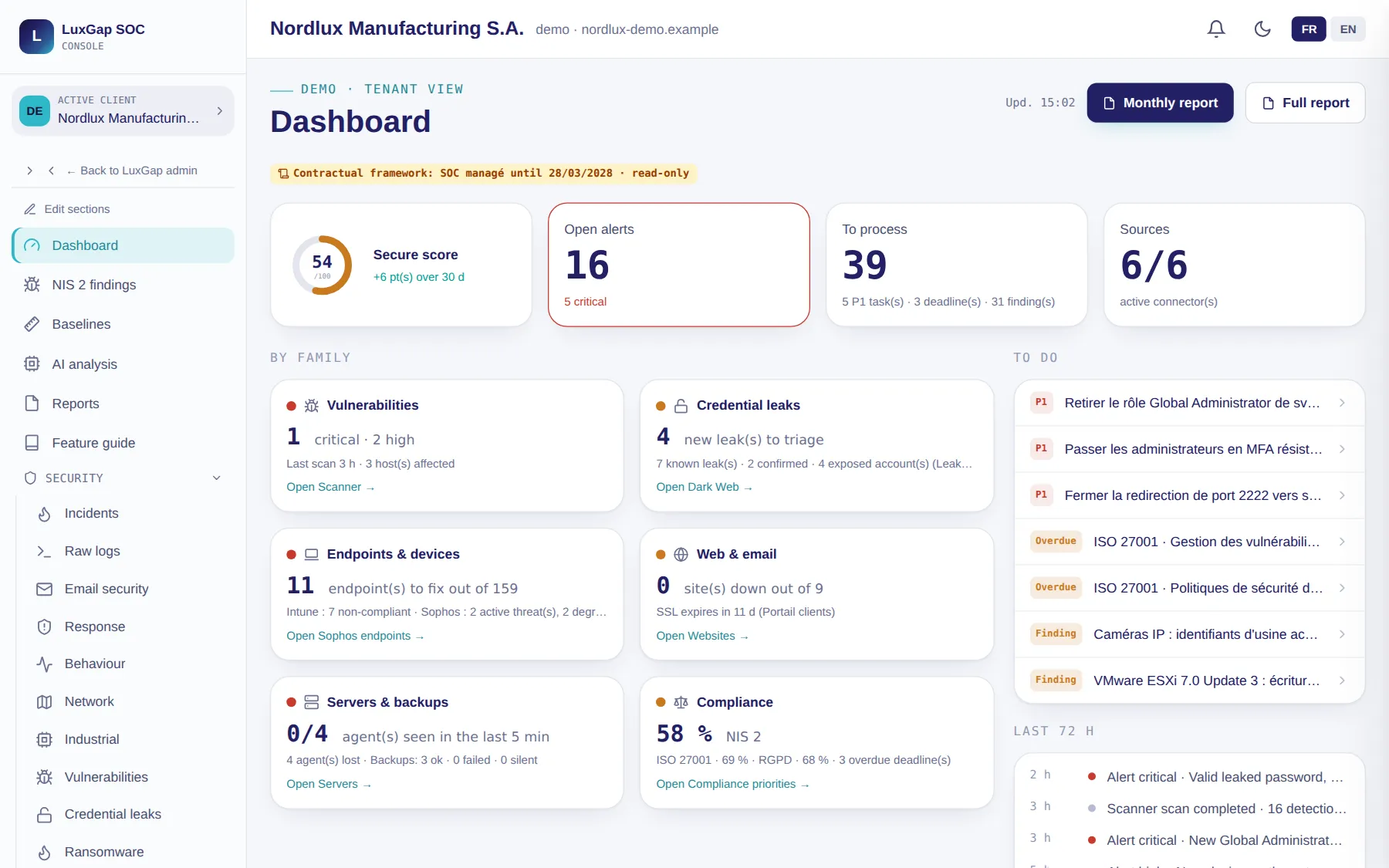
LuxGap SOC console: a client's dashboard, score, alerts and status by family
Demo client, fictitious data. Click a screenshot to enlarge it.

Feature guide

Every module explained: what it is for, whether it is active for you, how to enable it

The feature guide lists the advanced monitoring modules with their status for your organisation. Module pages open with a ‘What is this page for?’ panel: what it does, why it is useful, how to use it.

  • You only see the modules open to your role
  • The status is calculated from your data, never declared by hand

Example — demo client

Incident response, the network sensor and industrial monitoring show ‘Active (demo)’, with what would be needed to enable them at a real client.

Set-up: Included.

LuxGap SOC — Monitoring console
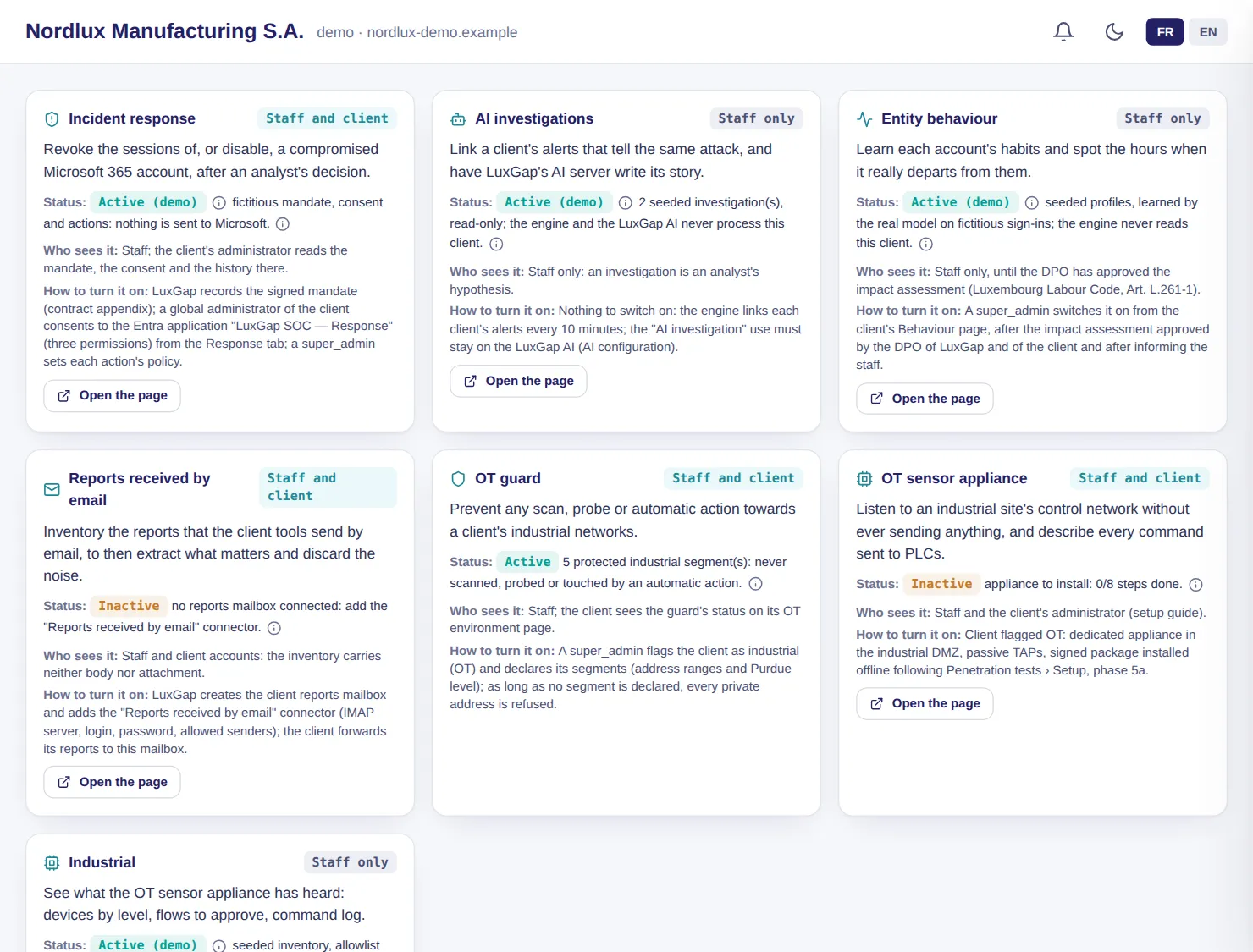
LuxGap SOC console: feature guide with the status of each module
Demo client, fictitious data. Click a screenshot to enlarge it.

French and English

A bilingual console, down to the AI's analyses

Each user chooses their language. Texts that the AI writes on demand are written directly in the console's language; analyses already written are translated when read, by LuxGap's AI.

  • Compliance catalogues (NIS2, ISO 27001, CMMC, TOMs, continuity) translated by dictionary
  • Your own entries are never translated

Example — demo client

Alongside, the demo client's dashboard in English: labels, menus and explanations change language; its data, entered in French, stays in French.

Set-up: Included.

LuxGap SOC — Monitoring console

LuxGap SOC console in English: dashboard of the demo client
Demo client, fictitious data. Click a screenshot to enlarge it.

And also

The other modules in the family

Accounts and roles

Named access, two-factor authentication, two roles on the client side

Your administrator invites colleagues with a single-use link valid for 72 hours; each person chooses their password and enrols their authenticator app. No client account opens a session without a second factor.

  • Administrator: manages users, takes charge of alerts, moves tasks forward
  • Reader: views the console read-only, for management, the DPO or an auditor
  • LuxGap can display the console exactly as you see it, read-only, to support you; every view is logged

Example — demo client

The IT director and the CISO are administrators; the DPO and the managing director have read-only access.

Set-up: Included.

Sovereign AI

The AI that triages, links and writes is hosted by LuxGap

Alert triage, posture analysis, recommendations and infrastructure watch run by default on LuxGap's AI server. Investigations, analysis of your documents, architecture reading, translation and the summary of received reports never leave it.

  • An analysis never acts on its own: it proposes, and an analyst or you decide
  • The figures in the analyses are calculated by code, not by the model
  • On request, an on-site edition: the SOC runs at your premises, with your own AI engine and no calls to an external provider

Set-up: Included.

Feature requests

An idea or a defect? The AI helps you word it, the team replies

From the console, a button opens a request: the AI asks one to three questions, then proposes a title, a description, a solution and acceptance criteria that you validate. You follow your requests in the console, and a refusal always comes with a reason.

Set-up: Included.

These modules, on your own perimeter

Describe what you want monitored: firm quote within 24 hours, annual contract, 100% guaranteed perimeter.

Request onboarding See pricing

Dealing with an incident right now? Call +352 621 583 116.