
Skip to content
LuxGapSOC
Monitoring active
EN
Console sign-in Request onboarding

← All features

Network and industrial

Network, architecture and industrial: seeing where no agent is installed

A passive sensor listens to a copy of the traffic, maps your network and flags an attacker's moves. At industrial sites, a dedicated appliance describes every command sent to the PLCs, without ever transmitting anything.

All screenshots come from the LuxGap SOC console, on a demo client: the company Nordlux Manufacturing and its data are fictitious.

Network sensor

The map of your network, and the moves of an attacker travelling across it

The sensor is connected to a mirror port or a passive TAP: it sends nothing onto your network. It learns your devices and who talks to whom, then flags anything out of the ordinary. No content is kept: only who talks to whom, when, how much and over which protocol.

  • Free-form map and view by sites and segments; new devices, refused flows and devices named in a detection highlighted
  • Passive inventory: address, manufacturer, ports, estimated role, without ever probing a device
  • Six rules: blind sensor, known intrusion, scan, DNS tunnel, lateral movement, new device
  • Learning period of 14 days, then every new item is approved or refused by an analyst
  • Traffic by protocol over 24 hours or 7 days, sensor health and capture losses

Example — demo client

An Internet address scans 412 ports and tries to exploit the firewall's VPN flaw; the next day, the ERP server opens never-before-seen connections to the file server and the NAS: a ‘lateral movement’ alert and a red link on the map.

Set-up: A capture card on the collection machine, linked to a mirror port or a TAP: up to 200 Mbit/s on the collection machine, 1 Gbit/s on a dedicated machine. Impact assessment and staff information before connecting; the network map is reserved for LuxGap analysts, while detections are alerts you can see.

LuxGap SOC — Monitoring console
Console views LuxGap SOC console: network map by sites and segments, as seen by the sensor LuxGap SOC console: network detections and passive device inventory
Demo client, fictitious data. Click a screenshot to enlarge it.

Architecture

A diagram of your infrastructure that redraws itself, blind spots included

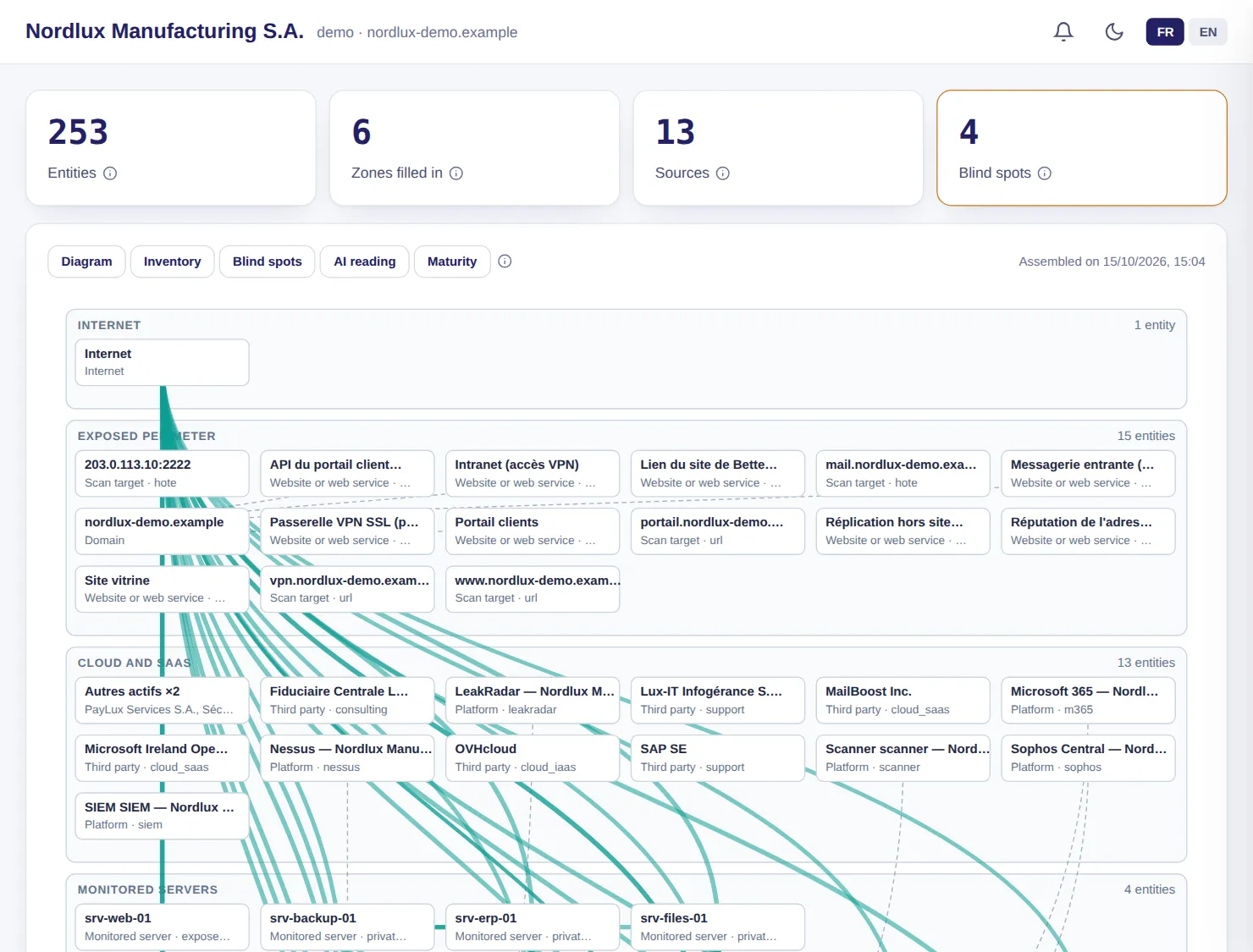
The SOC assembles the diagram of your infrastructure from everything it already knows: domains and email, websites, connected cloud services, servers and backups, inventoried assets, network sensor, vulnerable hosts, service providers. Nothing to draw or maintain.

  • A machine seen by several sources is a single element of the diagram
  • Calculated blind spots: server without an agent, without backup, without endpoint protection, silent agent
  • Inventory exportable as CSV, and architecture maturity
  • The first document in a NIS2 or ISO 27001 file, and the first question in an incident: what is exposed?

Example — demo client

253 elements are sorted into zones (Internet, exposed perimeter, cloud, monitored servers, internal network, industrial), and 4 blind spots are named.

Set-up: Included as soon as a source is connected. Visible to your administrator, never to read-only accounts: the diagram exposes the topology.

LuxGap SOC — Monitoring console

LuxGap SOC console: architecture diagram assembled automatically by zone
Demo client, fictitious data. Click a screenshot to enlarge it.

Industrial (OT)

Every command sent to your PLCs described, without ever transmitting anything

A dedicated appliance, installed in the industrial demilitarised zone, listens to the control network through passive TAPs. It describes every write, stop or program download to a PLC and flags whatever falls outside the flows approved with your plant operator.

  • View by level of the Purdue model, from the process to site operations
  • Industrial protocols: IEC 60870-5-104, Modbus/TCP, DNP3, S7comm, EtherNet/IP, OPC UA, IEC 61850 GOOSE and SV
  • Six rules: critical command, unknown master, new flow, new device, IT protocol at levels 0 to 2, zone crossing
  • Maintenance windows: severity drops one notch, the alert is never suppressed
  • Offline installation from a signed package; no automatic action: the SOC flags, the plant operator decides

Example — demo client

An unknown laptop writes the setpoint of a line 2 drive over Modbus: critical command, unknown master and a crossing from level 2 to level 0 are flagged together.

Set-up: With LuxGap and your plant operator: dedicated appliance, TAPs installed during a window approved by the operator, industrial segments declared. Console reserved for LuxGap analysts.

LuxGap SOC — Monitoring console

Console views LuxGap SOC console: Purdue view of industrial equipment and flows between levels LuxGap SOC console: industrial flows to approve with the operator
Demo client, fictitious data. Click a screenshot to enlarge it.

And also

The other modules in the family

OT guard

No scans and no automatic action towards your PLCs

A PLC is not a server: a simple port scan can freeze it. For an industrial client, the SOC refuses any scan, any availability probe and any automatic action towards the declared industrial segments.

  • Closed by default: as long as no segment is declared, every private address is refused
  • At the slightest doubt, nothing is scanned
  • Incident response refuses automatic mode for an industrial client

Example — demo client

The internal scan excludes the line 2 segments, and coverage says so: ‘industrial segments excluded (OT guard)’.

Set-up: Enabled by LuxGap as soon as you declare your industrial address ranges.

These modules, on your own perimeter

Describe what you want monitored: firm quote within 24 hours, annual contract, 100% guaranteed perimeter.

Request onboarding See pricing

Dealing with an incident right now? Call +352 621 583 116.