Skip to content
LuxGapSOC
Monitoring active
EN
Console sign-in Request onboarding

← All features

Detection and investigations

Detect, link, investigate, respond: what the SOC does with every signal

Alerts from all your sources arrive in a single list, triaged and explained by LuxGap's AI. Alerts that belong to the same attack become a written-up investigation, and a compromised Microsoft 365 account can be cut off within minutes, on an analyst's decision.

All screenshots come from the LuxGap SOC console, on a demo client: the company Nordlux Manufacturing and its data are fictitious.

Incidents and alerts

A single list for everything that reaches you, triaged and explained by AI

Microsoft 365, Google Workspace, antivirus and EDR, servers, network, vulnerabilities, dark web, websites, backups: every alert arrives in the same list. From medium severity upwards, LuxGap's AI classifies each one as ‘real risk’ or ‘noise’ and writes an explanation in the language of your console, with the steps to follow.

  • Alert drawer: the evidence, the geolocated source address (country, hosting provider, VPN or Tor), the AI analysis and the possible actions
  • Noise is archived automatically; a model error never archives anything
  • Correlation: five failures followed by a successful sign-in from the same address become a single critical alert
  • Your administrator takes charge of an alert or marks it as a false positive; final closure stays with the SOC

Example — demo client

This morning, the IT intern's leaked password is tried from the address that had already taken over a director's account four days earlier. MFA stops the sign-in; the AI classifies the alert as ‘real risk’, links it to the first intrusion, and disabling the account awaits an analyst's approval.

Set-up: Included: alerts come from the connected sources, synchronised every hour.

LuxGap SOC — Monitoring console
Console views LuxGap SOC console: drawer of a critical alert with the AI analysis and the proposed action LuxGap SOC console: list of incidents and alerts, all sources combined
Demo client, fictitious data. Click a screenshot to enlarge it.

AI investigations

Alerts that tell the story of the same attack, brought together and narrated

Every 10 minutes, the SOC links a client's alerts that share an account, an IP address, a device, a domain or a file within 72 hours of each other. LuxGap's AI reads the evidence file and writes the incident narrative: what happened, in what order, how severe it is, and what to do.

  • Timeline, graph of the accounts, addresses and devices involved, MITRE ATT&CK attack techniques
  • The AI can raise an investigation's severity, never lower it
  • The data stays with LuxGap: these investigations never go through an external AI provider
  • Nothing is executed without an analyst: the proposed actions go to the Response module, where they are approved or refused
  • Analyst search: an address, a domain, an IP or a CVE searched in one go across everything the SOC has already stored (leaks, lookalikes, exposed surface, ransomware, threat hunting, threat watch), without a single request leaving the SOC; the search term is never kept

Example — demo client

Six alerts spread over four days (password spraying, IMAP sign-in without MFA, mail-forwarding rule, account flagged as compromised, administrator sign-in from Nigeria, leaked password tried this morning) form a single critical investigation: ‘Jean Thill's account taken over through a leaked password; the attacker is now targeting other accounts’.

Set-up: Included, nothing to enable. Investigations are a tool for LuxGap analysts: you receive their conclusions and the actions to take.

LuxGap SOC — Monitoring console

Console views LuxGap SOC console: narrative of a critical investigation written by LuxGap's AI LuxGap SOC console: timeline and entity graph of an investigation LuxGap SOC console: a domain searched across all the SOC's sources
Demo client, fictitious data. Click a screenshot to enlarge it.

Incident response

A compromised Microsoft 365 account, cut off in minutes rather than hours

When an account is taken over, the SOC can cut its sessions, disable it, then re-enable it once the password has been changed. Detection proposes the action, an analyst approves it, then a separate service carries it out after re-checking every safeguard.

  • Nothing is done without your signed mandate and your consent to a dedicated application, limited to three permissions
  • Never on an administrator account, an account synchronised from your on-premises directory or an account you have protected
  • Every action is logged, and you are notified by email
  • Your administrator reads the mandate, the consent and the history of actions in the console

Example — demo client

Jean Thill's sessions are cut off, then his account is disabled 32 minutes after the intrusion; it is re-enabled the next day, password changed. The cut-off requested on Tom Kremer's administrator account is refused by the safeguard: that account is handled with the CISO.

Set-up: Microsoft 365 connector, response mandate appended to the contract, consent from your Global Administrator to the ‘LuxGap SOC — Response’ application.

LuxGap SOC — Monitoring console

Console views LuxGap SOC console: history of response actions, approved, executed or refused LuxGap SOC console: mandate, consent, policies and protected accounts of the Response module
Demo client, fictitious data. Click a screenshot to enlarge it.

Account behaviour

Spotting the attacker who signs in with valid credentials

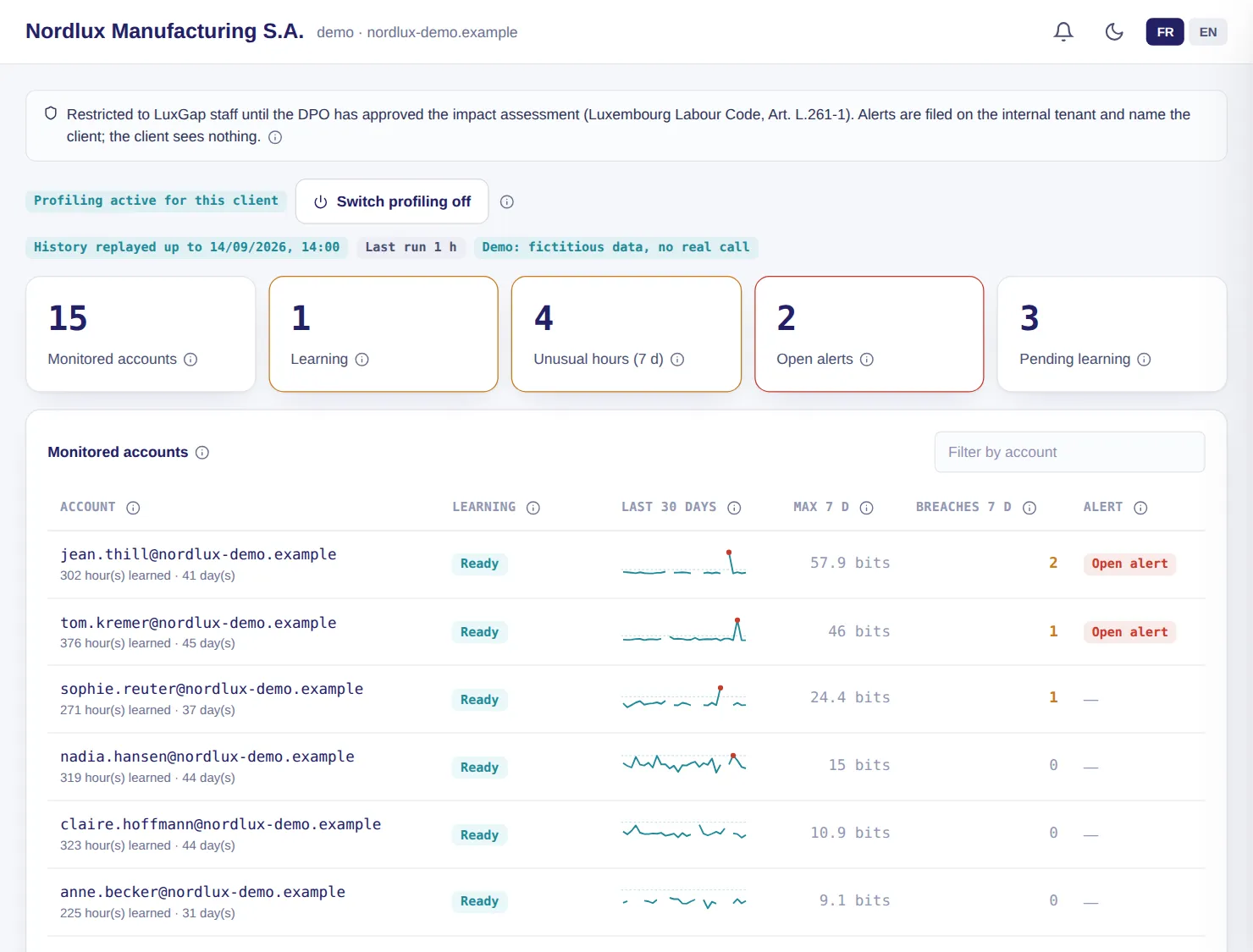
A stolen password triggers no rule. So the SOC learns what each account normally does (country, network operator, device, sign-in method, hours, volumes, sensitive actions) and scores every hour of activity: the less likely it is for that account, the more it counts.

  • An account is learned in 14 days; a habit is only retained after three distinct days, so that an attacker cannot teach the profile their own activity
  • A highly unusual hour raises an alert, five at most per day and per client
  • A legitimate trip is marked ‘This is normal’ and stops raising alerts
  • Sources: Microsoft Entra ID sign-ins and audit logs, Google Workspace activity

Example — demo client

Jean Thill's IMAP sign-in in the middle of the night, from Nigeria, combines a country, an operator and a protocol never seen before: the hour is flagged. The DPO's trip to Lisbon, on the other hand, is marked ‘this is normal’.

Set-up: Off by default. Enabled by LuxGap after the impact assessment validated by your DPO and the information of staff (Luxembourg Labour Code, art. L.261-1).

LuxGap SOC — Monitoring console

LuxGap SOC console: tracked accounts, learning status and unusual hours per account
Demo client, fictitious data. Click a screenshot to enlarge it.

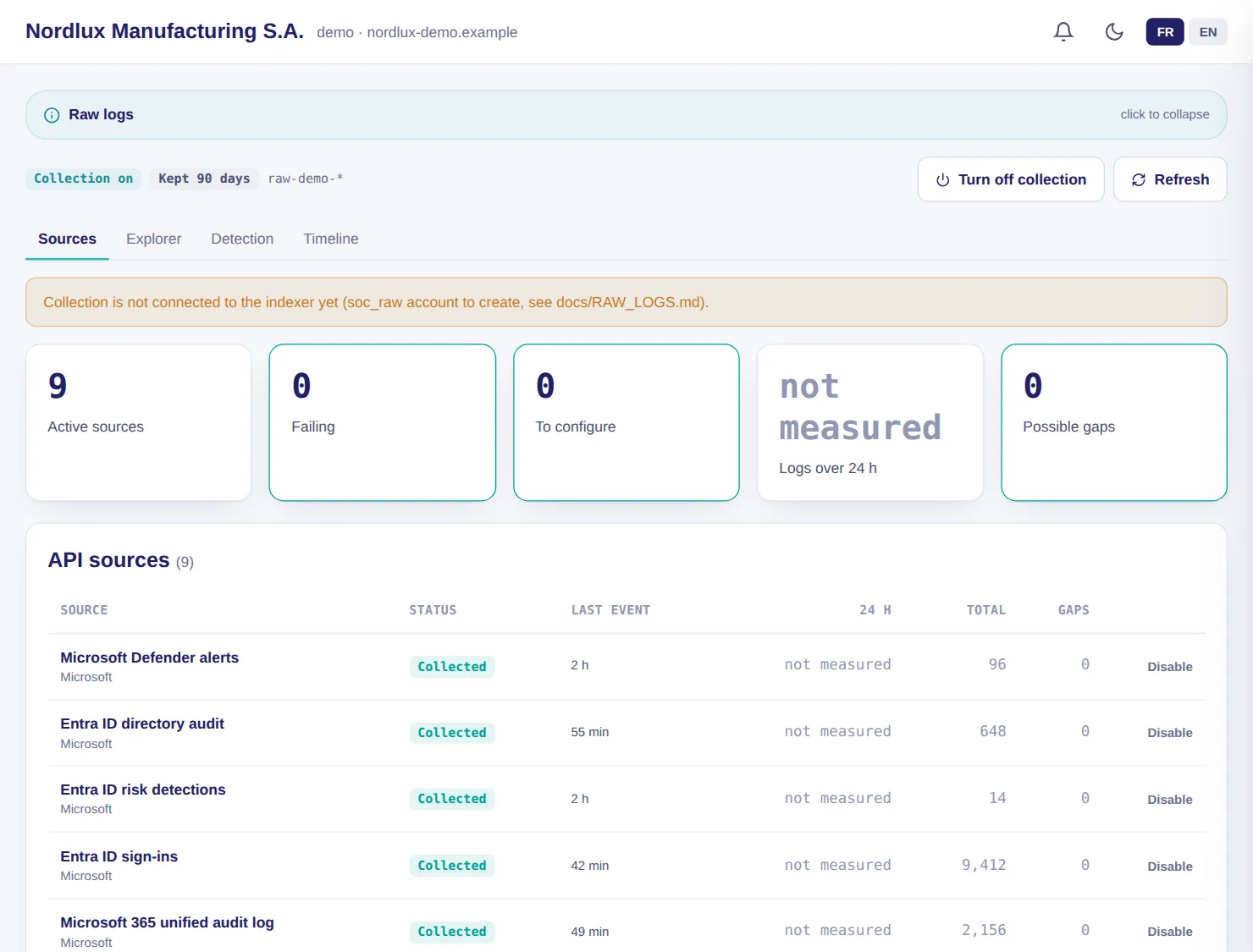
Raw logs

All your logs kept and searchable during an incident

The logs from your cloud services, firewalls, servers and applications are collected into an index dedicated to your organisation. During an incident, the analyst searches all sources at once and reconstructs the timeline of an account, an address or a device.

  • Retention of your choice: 30, 60, 90, 180 or 365 days, applied to the day
  • Search across all sources, from one hour to 90 days, CSV export
  • Timeline at 1 h, 6 h, 24 h or 72 h around an event, exportable with a SHA-256 hash as evidence
  • Eighteen detection rules every 5 minutes, including six for the network sensor and four for reports received by email: password spraying, compromised account, privilege escalation, public sharing, legacy authentication, reused leaked password
  • A source silent for more than 6 hours raises an alert; every search is logged

Example — demo client

Nine sources are collected: Entra ID sign-ins, audit and risk detections, Defender alerts, Sophos events and alerts, server logs and activity in the console.

Set-up: Connectors to your services and, for network and server logs, a collection machine installed at your premises, linked to the SOC through an outbound encrypted tunnel.

LuxGap SOC — Monitoring console

LuxGap SOC console: raw log sources collected and their status
Demo client, fictitious data. Click a screenshot to enlarge it.

And also

The other modules in the family

Threat intelligence and hunting

When a threat is published, the SOC checks whether it has already hit you

The indicators of compromise published by CIRCL, the Luxembourg response centre, are imported every 6 hours and searched for in your logs for the previous 90 days, then continuously. The watch also aggregates advisories from CERT-FR, CISA, Microsoft and ESET, each with a summary.

  • Verdict per client: hit, not hit over the period covered, or unverifiable with the reason
  • A match is triaged by an analyst before you are notified
  • Daily brief and affected clients, identified by vendor and product

Example

A feed publishes the address of a command-and-control server; hunting finds it in last month's connections; the analyst confirms, then notifies you.

Set-up: Included as soon as your raw logs are collected.

Reports received by email

The reports nobody reads in full, read for you

Firewall, antivirus, backups, monitoring: your tools send reports by email. You have them forwarded to a dedicated mailbox; the SOC reads the body and attachments (PDF, CSV, Excel, HTML), adds them to your logs and keeps only what matters.

  • Four rules: error reported, spike in blocked lines, target the SOC knows to be vulnerable or exposed, tool that stops sending
  • Only the senders you authorise are read
  • On-demand summary by LuxGap's AI, with no external provider

Example

Your firewall sends a report every night. The day its blocked lines triple, an alert is raised; the day it falls silent, one is raised too.

Set-up: With LuxGap: creation of the reports mailbox and the list of authorised senders.

These modules, on your own perimeter

Describe what you want monitored: firm quote within 24 hours, annual contract, 100% guaranteed perimeter.

Request onboarding See pricing

Dealing with an incident right now? Call +352 621 583 116.